Birch alternative: Ads Editor vs Bïrch (formerly Revealbot)
By Matheus Mello, founder of Ads Editor and owner of YEP Agência · Published · 9 min read
Birch alternative searches (Bïrch, formerly Revealbot) usually start with the bill: its price follows your ad spend. Bïrch has one of the most capable rules engines on the market, so this comparison says clearly where it is ahead before showing where Ads Editor fits better.
Quick answer
Bïrch, formerly Revealbot, is an automation platform for Meta, Google, TikTok and Snapchat with an advanced rules engine, priced by monthly ad spend from $49. Ads Editor is the alternative for agencies on Meta and Google who want pricing by account count, cross-account copies, bulk audiences, balances and client reports. Compare using your real spend.
Summary
- Bïrch leads on rules: nested conditions, custom metrics, 20+ actions, comparisons with last week and data from AppsFlyer, Adjust and Hyros.
- Bïrch prices by ad spend; Ads Editor prices by number of ad accounts, whatever you spend.
- Rules are on the Bïrch Pro plan ($99 a month up to $10K of spend); Ads Editor includes rules from Starter.
- Ads Editor adds cross-account copies, bulk audiences, a balance monitor and an MCP that changes campaigns.
- Prices and features are what each official page showed on September 29, 2026.
How was this comparison made?
- Sources: every claim about Bïrch comes from its own website, pricing page or documentation, read on September 29, 2026. We did not test Bïrch on a live account.
- Ads Editor claims describe what the product does today, checked against the product itself on the same date.
- Prices are shown in the currency each vendor uses, without conversion. When a page did not show a value, the table says price not verified.
- Conflict of interest: Ads Editor is ours. That is why each tool, ours included, gets a section on what it does not do.
What are Bïrch and Ads Editor?
Bïrch, formerly known as Revealbot, is an ad automation platform. Its main parts are a rules engine, Stage (a bulk launcher that works from Google Drive and Google Sheets), Explorer (creative performance and fatigue), Hub (server-side tracking for Meta), Bïrch AI and an MCP. It supports Meta, Google Ads, Snapchat and TikTok. Its homepage claims $2B of annual ad spend managed and 15K ad accounts connected, vendor numbers we could not check.
Ads Editor is an independent platform for media buyers and agencies that run Meta Ads and Google Ads through the official APIs. It is not Google Ads Editor, and it is not a Meta or Google product. The side by side with the native tool is in Ads Editor vs Meta Ads Manager.
Both tools automate budget and status changes. The difference is in the center of gravity: Bïrch is built around rules across many ad networks; Ads Editor is built around the daily operations of an agency with many Meta and Google client accounts.
How do the features compare?
| Task | Bïrch | Ads Editor |
|---|---|---|
| Channels | Meta, Google Ads, Snapchat, TikTok | Meta Ads and Google Ads |
| Rule conditions | Nested conditions, custom metrics, comparisons with previous week | Metric greater than or less than a value; no comparison with a previous period |
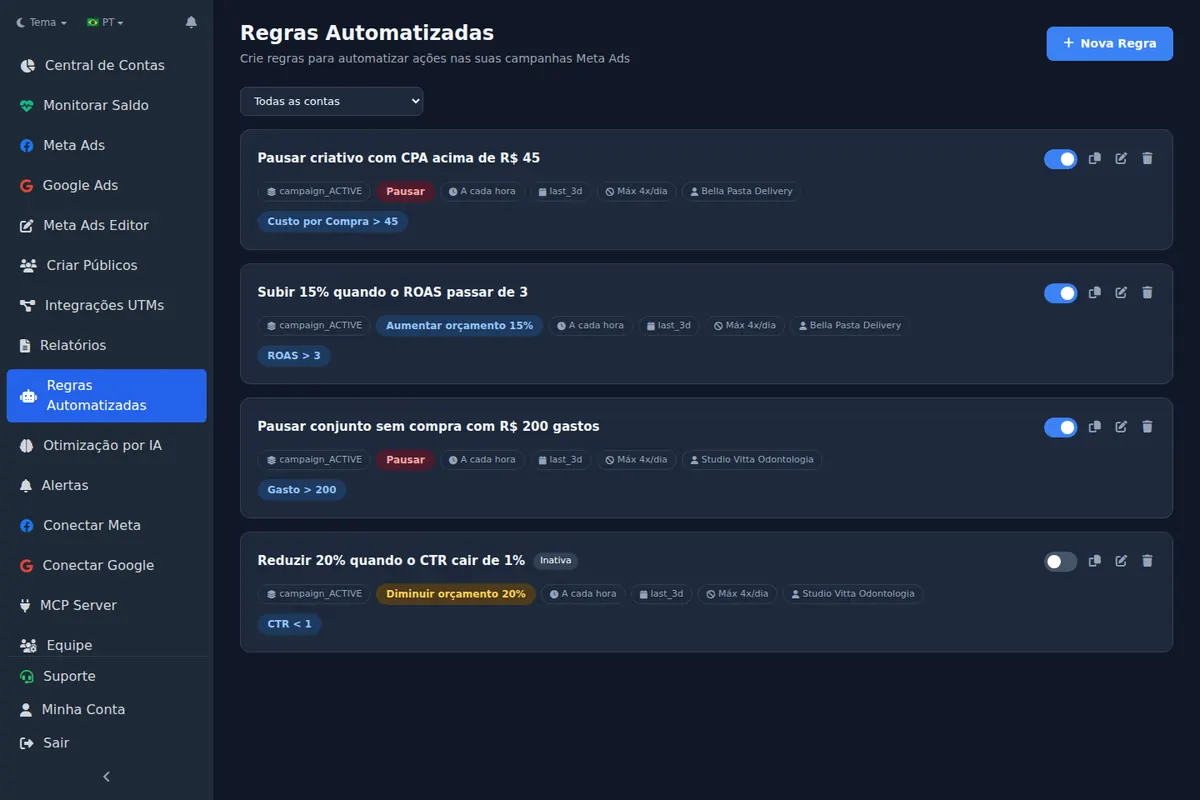
| Rule actions | 20+ actions | Pause, activate, raise, cut or set budget, and notify |
| How often rules run | Every 15 minutes | You choose, from every 10 minutes to once a day |
| Rules across accounts | Yes | Yes, one rule over several accounts |
| External data in rules | AppsFlyer, Adjust, Hyros | No |
| Automatic scaling | Strategies on the Pro plan | Scaling engine capped at 35% per cycle |
| Bulk launch | Stage, from Google Drive and Sheets, to Meta, TikTok and Snapchat | Publishing queue into many campaigns and accounts, Meta |
| Google Drive | Connect several Drives with view-only access | Beta: public Drive links through the MCP, up to 25 files per import |
| Keep likes and comments | Post ID support | Copies reuse the same post; Instagram posts can be launched as existing posts |
| Copy a campaign to another account swapping Page, pixel and WhatsApp | Not claimed on its pages | Yes, with audiences remapped by name |
| Bulk audiences | Audience builder on Pro | Yes: custom, lookalike, Instagram, engagement, video and site |
| Balance and status of every account | Not claimed | Yes, Meta and Google on one screen |
| Server-side tracking | Hub, free up to 10,000 events a month | No |
| MCP | Reads rules, logs and account structure; manages existing rules; cannot edit budgets | Over 200 tools that read and change Meta and Google campaigns, budgets included |
| Pricing model | Monthly ad spend tier | Number of ad accounts, from US$ 19/month |
Where is Bïrch better?
- Rules depth. Nested conditions, custom metrics, 20+ actions and comparisons with last week. Ads Editor compares a metric with a fixed value only.
- App and attribution data. Rules can use AppsFlyer, Adjust and Hyros data. Ads Editor does not read them.
- More channels. Snapchat and TikTok, in rules and in Stage. Ads Editor is Meta and Google only.
- Creative analytics and tracking. Explorer for fatigue and top assets, and Hub for server-side tracking.
- Google Drive. Stage connects Drive folders directly. Ads Editor reads only public Drive links, in beta.
- Longer trial. 14 days free, without a card according to the page, against 7 on Ads Editor.
Where is Ads Editor better?
- Pricing by account, not by spend. When spend grows, the Ads Editor bill does not. Rules are included from the US$ 19 Starter plan (3 active rules), up to unlimited on Business.
- Cross-account copies. Copy a campaign to another client account swapping Page, Instagram, pixel and WhatsApp. See how to copy a Meta Ads campaign to another ad account.
- Balance monitor. Every Meta and Google account on one screen, with low balance alerts. See how to track your ad account balance.
- Client reports as a link, with Meta, Google and Instagram data and PDF export.
- An MCP that acts. Bïrch's MCP cannot create rules or edit budgets, in its own words. The Ads Editor MCP edits campaigns and budgets, with a safety ceiling on the server.
- Scaling built for the learning phase. Automatic scaling capped at 35% per cycle. The reasoning is in how to scale Meta Ads.
How does pricing compare?
| Plan | Price | What is included |
|---|---|---|
| Bïrch Essential | $49/month up to $10K of monthly spend | Workspaces, post boosting, reports, Slack; no automated rules |
| Bïrch Pro | $99/month up to $10K of monthly spend | Automated rules and strategies, Explorer, Launcher, Stage, audience builder, integrations |
| Bïrch above $10K of spend | Price not verified | Overages apply if the spend limit is exceeded |
| Bïrch Enterprise | Price not verified | Unlimited Stage, onboarding, premium support |
| Ads Editor Starter | US$ 19/month | 10 Meta + Google ad accounts, 1 member, 3 active rules |
| Ads Editor Pro | US$ 39/month | 20 accounts, 3 members, 10 rules, AI Copilot and MCP |
| Ads Editor Business | US$ 79/month | 40 accounts, 5 members, unlimited rules |
| Ads Editor Scale | US$ 139/month | 70 accounts, unlimited members |
Bïrch showed 20% off for annual billing and said pricing depends on monthly ad spend across all connected accounts. The prices above are for the up to $10K tier that the page selects by default, and are the same numbers our best Facebook ads tools list showed on September 23. Ads Editor plans are billed in US dollars by number of accounts, with 20% off yearly; the full table is on the pricing page.
Do the math with your own spend
For an agency spending $10K a month across all clients, the gap is small. As spend grows, a spend-based price rises and an account-based price does not. Prices are what the pages showed on September 29, 2026; the vendor page is what counts.
What does each tool not do?
Bïrch
- Flat pricing: cost follows your ad spend tier.
- Automated rules on the Essential plan; they start on Pro.
- Cross-account copies with Page and pixel swaps, and a balance monitor, do not appear on its pages.
- Its MCP cannot create rules or edit budgets.
Ads Editor
- TikTok, Snapchat or any network other than Meta and Google.
- Rules that compare with a previous period, nested conditions, or AppsFlyer, Adjust and Hyros data.
- Server-side tracking and a creative analytics module like Explorer.
- Private Google Drive folders: the Drive import is in beta and reads only public links.
- Sales by ad from Shopify or Stripe: the checkout integrations today cover platforms popular in Brazil only.
How do you migrate from Bïrch without losing your rules?
- List your active Bïrch rules, including conditions, date ranges, actions and frequency.
- Recreate them in Ads Editor as notification-only rules first, and run both tools for a week to compare the alerts.
- Switch rules to real actions one at a time, and turn off the matching Bïrch rule the same day. Two automations changing the same budget will fight each other. If you have many accounts, the Ads Editor MCP can create and update rules across them from a chat with Claude or ChatGPT.
- Check the date range: Ads Editor shows whether each range includes today. See Meta Ads automated rules.
- A budget-increase rule can become automatic scaling in steps of up to 35%. Avoid running a separate budget rule on the same campaign. See how to scale Meta Ads.
Which one should you pick?
- If your edge is complex rules, app attribution data or TikTok and Snapchat, Bïrch is the stronger tool.
- If you run Meta and Google for many clients and your week goes to launching, copying, checking balances and reporting, trial Ads Editor.
- Price both with your real monthly spend and account count, not the entry plan.
- Run the trials in a real week: 14 days on Bïrch, 7 on Ads Editor.
Frequently asked questions
Is Bïrch the same as Revealbot?
Yes. Bïrch's own site describes it as formerly known as Revealbot.
How much does Bïrch cost?
On September 29, 2026, Essential was $49 and Pro $99 a month up to $10K of monthly ad spend, with overages above that. Rules are on Pro.
Does Ads Editor charge by ad spend?
No. Ads Editor charges by number of Meta and Google ad accounts, from US$ 19 a month for 10 accounts to US$ 139 for 70.
Which tool has the more advanced rules?
Bïrch: nested conditions, custom metrics, 20+ actions, comparisons with last week and attribution data. Ads Editor rules compare metrics with fixed values.
Glossary
- Ad spend tier
- A pricing model where the tool's price rises with how much you spend on ads.
- Rules engine
- Automation that pauses, activates or changes budgets when conditions are met.
- Server-side tracking
- Sending conversion events from a server to the ad platform instead of only from the browser.
References
- Bïrch pricing. Supports: Essential $49 and Pro $99 per month on the up to $10K spend tier; overages if the spend limit is exceeded; annual billing 20% off; rules, Explorer, Launcher, Stage and audience builder on Pro; Hub free up to 10,000 events; 14 day free trial.
- Bïrch homepage. Supports: Formerly known as Revealbot; rules with nested conditions, custom metrics and 20+ actions checked every 15 minutes; comparisons with previous week; AppsFlyer, Adjust and Hyros; Meta, Google Ads, Snapchat and TikTok; claims of $2B annual spend and 15K ad accounts.
- Bïrch Stage. Supports: Bulk launching from Google Drive and Google Sheets to Meta, TikTok and Snapchat; multiple Drives with view-only access; free plan available.
- Bïrch MCP. Supports: Read access to rules, execution logs and account structure; can enable, disable, rename or move existing rules; cannot create rules, edit budgets or rule conditions; works with Claude, ChatGPT and Codex.
Links opened and checked on Oct 4, 2026.
About the author
Matheus Mello, founder of Ads Editor and owner of YEP Agência. Runs client ad accounts at YEP Agência and built Ads Editor so his own agency could stop publishing ads one at a time. Usage numbers quoted on the blog come from the product activity log. Instagram: @theusm