Facebook ad account balance: how to check it and monitor every account
By Matheus Mello, founder of Ads Editor and owner of YEP Agência · Published · Updated · 8 min read
Facebook ad account balance problems never announce themselves: prepaid funds run dry or a card gets declined, delivery stops, and everyone assumes the campaign is still live. With one account, you notice. With 20 client accounts, you find out from the client. Here is how to check the balance in Meta's own tools, which account states to watch, and how to monitor every account on one screen.
Quick answer
To check a Facebook ad account balance, open Billing and payments for that account in Meta Ads Manager. To watch many accounts, use one screen that calculates days of funds left and ranks the accounts that run out first, such as Ads Editor's Account Monitor: red under 3 days or disabled, yellow at 3 to 7.
Summary
- In Meta's own tools, the balance lives in each account's Billing and payments settings: fast for one account, slow for thirty.
- Watch six states: active, payment pending, disabled for failed payment, disabled for policy, grace period and spending limit reached.
- Days remaining is prepaid funds divided by recent average daily spend. Recheck it after every scaling session, not once a week.
- Balance tells you whether an account is about to stop; metric alerts tell you whether it is spending badly. You need both.
- The Ads Editor account monitor colors every Meta prepaid account by days of funds left, shows Meta and Google side by side, and its Charges button lists what Meta charged on each account.
In this article · 7 sections
How do you check a Facebook ad account balance in Ads Manager?
Open the ad account's Billing and payments settings. Accounts on manual payments show the remaining prepaid funds. Accounts on automatic payments show the payment method, the billing threshold and recent charges. It takes a minute for one account and most of a morning for thirty, because every check means switching accounts again.
Which ad account states stop delivery?
| State | What it means | Action |
|---|---|---|
| Active | Normal delivery | None; keep an eye on days of funds left |
| Payment pending | A charge did not go through | Tell the client today |
| Disabled: failed payment | Account blocked over a billing issue | Fix the payment method |
| Disabled: ad policy | Blocked for a policy violation | Check the ads and request a review |
| Grace period | Time left before a block | Resolve it before the deadline |
| Spending limit reached | The account hit the maximum it is allowed to spend | Raise or remove the account spending limit |
Meta's own documentation lists these account statuses, including unsettled, in grace period and closed, and states that when an account reaches its spending limit, all delivery stops. The spending limit is the one teams forget: the card is fine, the funds are fine, and nothing runs.
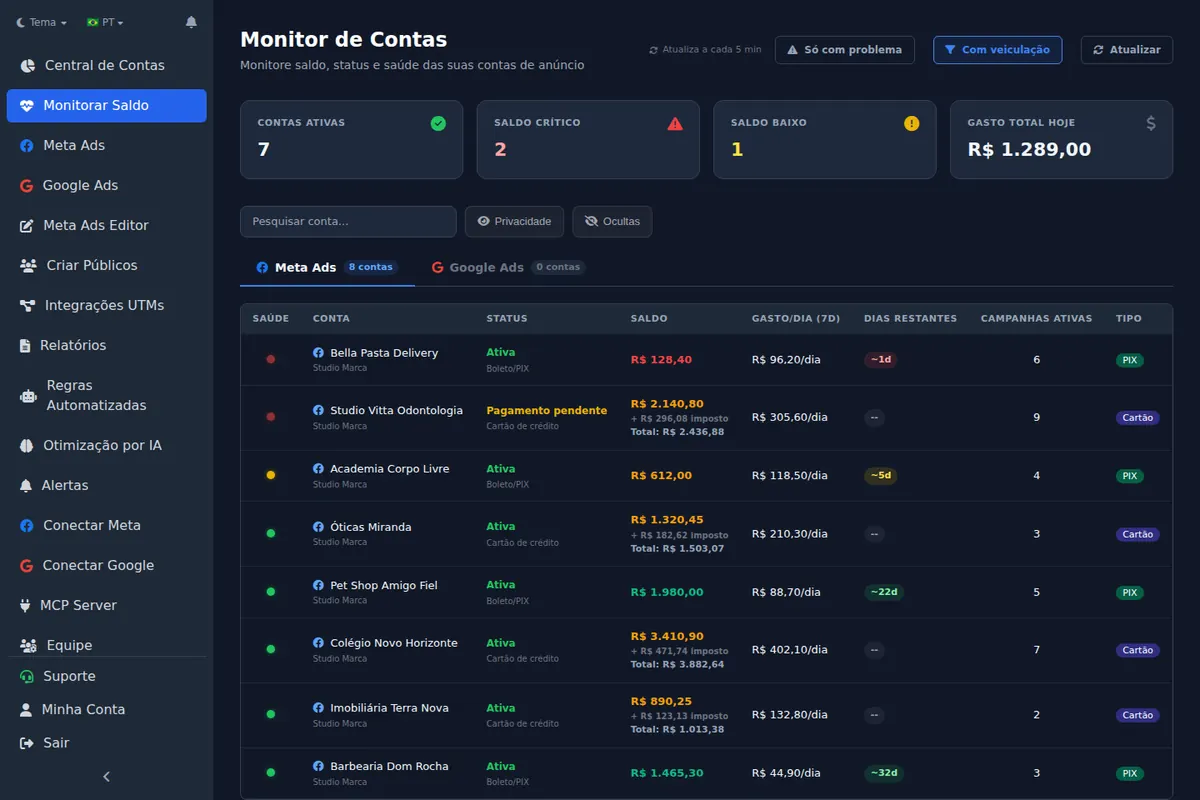
For Google Ads accounts, the monitor shows status (enabled, suspended, canceled or closed), average daily spend and active campaigns. Balance and days remaining apply to Meta accounts running on prepaid funds.
How many days of funds does an account have left?
Days remaining is the balance divided by recent average daily spend. An account with $600 in prepaid funds that averaged $150 a day over the last week has about 4 days left. The math is simple; doing it for 30 accounts every day is the hard part. The monitor shows it in a days remaining column and lets you filter down to just the accounts with problems.
Illustrative scenario (not a real client)
A client on manual payments adds funds every Monday. After a creative starts working, spend climbs from $80 to $150 a day, and the funds that used to last a week now run out on Thursday. A days-remaining check on Tuesday gives the client two days to top up; the old weekly habit would have cost them Friday through Sunday.
Why does balance matter more when you scale?
When a campaign is scaling in steps throughout the day (see how to scale Meta Ads), daily spend can multiply within hours. An account with a comfortable week of funds at breakfast can be empty by dinner. Check days remaining after every scaling session, not once a week.
What is the difference between a balance monitor and a metric alert?
Balance tells you whether the account is about to stop. A metric alert tells you whether the account is spending badly. You want both: metric alerts cover CPA, CPC, CPM, CTR, spend and ROAS, and they are part of the monitoring layer described in how to manage multiple Meta Ads accounts.
In Ads Editor's Account Monitor, every Meta prepaid account gets a color by days of funds left: red (critical) under 3 days or when the account is disabled, yellow (low) at 3 to 7 days, green above 7. Accounts with spend and under 30 days left also show a suggested top-up worth 20 more days at the last 7 days' average spend, which is the number you send the client. The point is to warn the client before delivery stops, not after.
How can an agency monitor many ad account balances?
| Option | What it shows | Limit |
|---|---|---|
| Meta Ads Manager, Billing and payments | Balance and charges for the open account | One account at a time: 30 accounts means 30 visits |
| A script or spreadsheet on the API | Whatever you build | Needs a developer and upkeep whenever the API changes |
| Ads Editor's Account Monitor | Balance, average spend, days left and status for Meta and Google, colored by urgency, with a problems-only filter | Balance and days left apply to Meta's prepaid accounts; on Google, status and spend |
In Ads Editor's Google manager, since October 11, 2026, the indicator at the top shows the account's real state: active, payment under review, prepaid balance running out (3 days or less), suspended, no payment method or no access, with the reason on hover.
If you also want rules that act on spend or results across accounts, the tools are compared in best Meta Ads automation rules tools.
How do you see what Meta charged to each account's card?
The question every client asks at month end is how much actually hit the card. The account monitor has a Charges button that pulls Meta's charges from all your accounts into one place, so you do not have to open Billing account by account.
- Every charge with date, amount, transaction ID and payment method. On prepaid accounts, balance top-ups show up too.
- The amount charged, as Meta reports it in Billing (for accounts billed in Brazilian reais, Brazilian taxes are added so it matches the card statement).
- Total charged next to ad spend for the same period, so you can compare the two at a glance.
- The period you need: 7, 30 or 90 days, this month, last month or custom dates, with the start and end dates always shown on screen.
- Account search and an alphabetical list, so you can find a client fast even across hundreds of accounts.
- PDF report for the period, in the invoice summary layout, ready to send to the client or to finance.
The same data is available to an AI assistant connected through the Ads Editor MCP: ask Claude or ChatGPT "how much was charged on client X's account in August?" and you get the charges for that month.
What Meta does not tell you
Meta only reports the account's primary card, so there is no way to tell which card each charge hit: that lives in Billing and payments, under Payment activity. Not every charge comes through the integration either. When the total charged is well below spend for the period, the screen warns you, so you can check Billing before you close out the month with the client.
Step by step in Ads Editor
Help Center articles that walk through this task screen by screen:
Frequently asked questions
How do I check my Facebook ad account balance?
In Meta Ads Manager, open Billing and payments for the account. Prepaid accounts show remaining funds; accounts on automatic payments show the payment method, billing threshold and recent charges. If you manage many accounts, an account monitor shows balance and days remaining for all of them on one screen.
Why did my ads stop if the account has funds?
Check the account status and the account spending limit. A pending payment, a policy block or a spending limit that has been reached will all stop delivery, even with funds or a valid card.
Does the Ads Editor monitor work for Google Ads?
Yes. It lists Meta Ads and Google Ads accounts with the status of each one, and you can hide accounts you no longer need to track.
Can I see what Meta charged on each account's card?
Yes. The Charges button in the account monitor lists every charge with date, amount and transaction ID, shows the total next to ad spend and exports the period as a PDF.
How do I get low-balance warnings for many ad accounts?
Meta Ads Manager has no multi-account view. In Ads Editor, the Account Monitor flags accounts under 3 days of funds in red and 3 to 7 days in yellow, with a filter that shows only those.
Glossary
- Prepaid funds
- Money added in advance to a Meta ad account on manual payments; ads stop when it runs out.
- Billing threshold
- The amount at which Meta charges the payment method on an account with automatic payments.
- Days remaining
- Balance divided by recent average daily spend.
- Grace period
- The window before an account with an unresolved issue is restricted.
- Account spending limit
- The maximum an ad account is allowed to spend; when it is reached, all delivery stops.
References
- Ad Account reference (Meta for Developers). Supports: Meta's list of ad account statuses (active, disabled, unsettled, pending risk review, pending settlement, in grace period, pending closure, closed) and the spending limit: when it is reached, all delivery stops.
- Ads Editor on the App Store. Supports: Official App Store listing of the Ads Editor app for iPhone and iPad.
The claim supported by each source is shown above.
About the author
Matheus Mello, founder of Ads Editor and owner of YEP Agência. Runs client ad accounts at YEP Agência and built Ads Editor so his own agency could stop publishing ads one at a time. Usage numbers quoted on the blog come from the product activity log. Instagram: @theusm