Google Ads experiments: how to A/B test a bid strategy or landing page
By Matheus Mello, founder of Ads Editor and owner of YEP Agência · Published · 7 min read
Google Ads experiments answer the question every media buyer asks before switching a client's bid strategy: what if it gets worse? Instead of changing the whole campaign and hoping, you run the change on a copy that splits traffic with the original, and decide with numbers.
Quick answer
Google Ads experiments run one change on a copy of a campaign that splits traffic and budget with the original. Use them to test a new bid strategy or landing page without risking the account: a 50% split, one change at a time, and a decision only at statistical confidence. Then apply it to the original or end it.
Summary
- Custom experiments work on Search, Display, Video and Hotel campaigns; Shopping and App are excluded.
- The trial uses the original campaign's traffic and budget; Google recommends a 50% split.
- Up to five scheduled experiments per campaign, but only one running at a time.
- Changes made to the original during the test do not reach the trial and muddy the result.
- In Ads Editor, an experiment changes the bid strategy or landing page and shows statistical confidence before you apply it.
What is a Google Ads experiment, and when should you use one?
A custom experiment creates a trial version of a campaign, applies the change you want to evaluate, and splits traffic and budget between the original and the trial. What Google Ads Help says, checked on October 17, 2026:
- Custom experiments are available for Search, Display, Video and Hotel campaigns. Shopping and App campaigns cannot use them.
- You can schedule up to five experiments per campaign, but only one runs at a time.
- The original campaign must be active, because the trial depends on it.
- Changes to the original campaign are not reflected in the experiment.
- When you apply, the changes go to the original or the trial becomes a new campaign; performance data is kept either way.
Use one when the change touches money and you are not sure of the effect: moving from manual CPC to automated bidding, adding a CPA target, sending traffic to a new page. For a small, reversible tweak like one more negative keyword, an experiment is overhead.
What is worth A/B testing in Google Ads?
| Change in the trial | Question it answers | What to read |
|---|---|---|
| Manual CPC to Maximize conversions | Does automated bidding bring more conversions for the same spend? | Conversions and CPA |
| Maximize conversions to Target CPA | Does a CPA target hold cost without killing volume? | CPA and conversions |
| Maximize conversion value to Target ROAS | Does a ROAS target improve return without cutting revenue? | Conversion value and ROAS |
| Landing page A to page B | Does the new page convert the same click better? | Conversion rate |
| Maximize clicks to Maximize conversions | Is there enough conversion data for automated bidding yet? | Conversions and cost per click |
One change per experiment. If the trial swaps both the bid strategy and the page and wins, you cannot tell which one won.
How do you set up a custom experiment in Google Ads?
- Open Experiments under Campaigns.
- Click the plus button above the All experiments table, choose Custom and then the custom test for your campaign type.
- Name the experiment, pick the original campaign and a suffix for the trial campaigns.
- Select up to two success metrics.
- Make the change on the trial campaign.
- Under the experiment split, set the share of traffic and budget. Google recommends 50%.
- Under scheduling, pick a start date and duration, then save.
Cookie-based or search-based split?
With a cookie-based split, which Google recommends, each person sees only the original or only the trial. With a search-based split, assignment happens on every search, so one person may see both; Google says it may reach statistical significance faster. For a landing page test, cookie-based keeps people from seeing both pages. Display experiments always use a cookie-based split.
How do you run and read an experiment in Ads Editor?
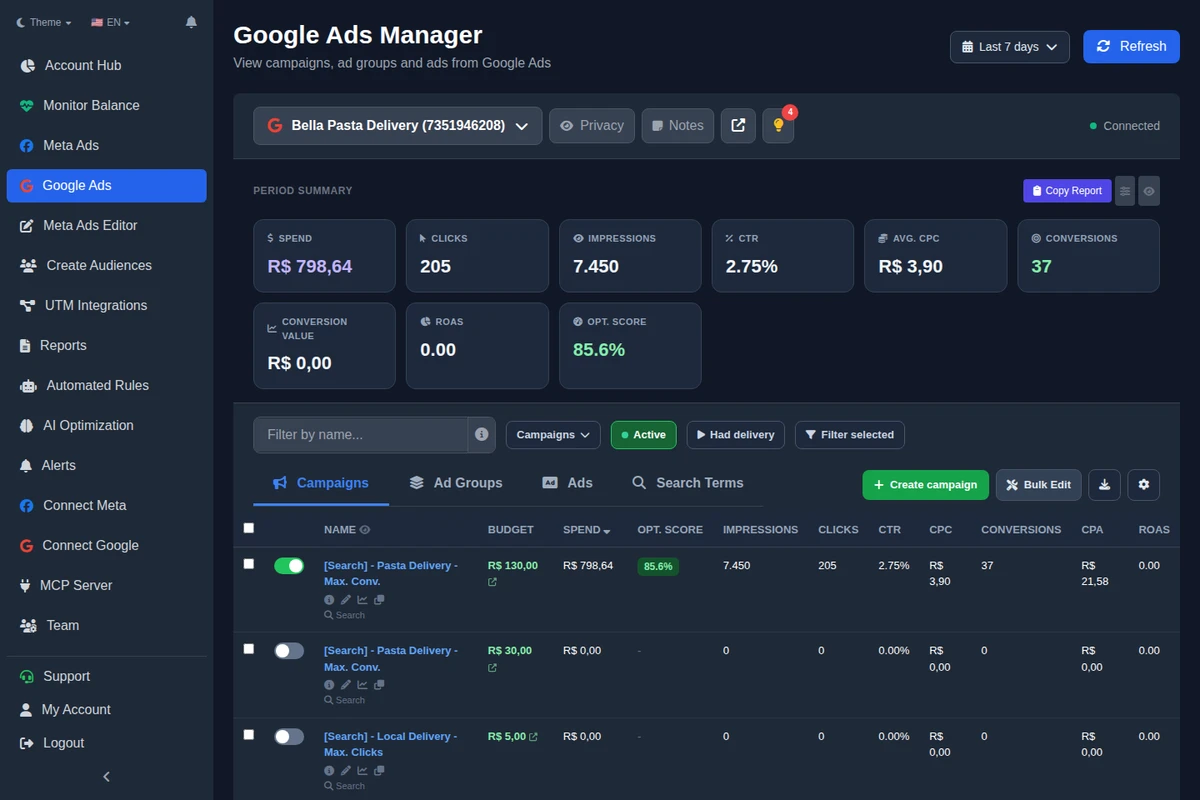
Since October 10, 2026, Ads Editor's Google manager creates experiments on Search and Display campaigns, from the campaign's Edit panel, under Experiment (A/B test).
- Click New experiment and name it.
- Choose what the trial changes: the trial bid strategy (with the target CPA or ROAS when it applies) or a new landing page. For the page, you can replace only the ads that use a specific URL, or all of them.
- Set the trial traffic split from 10% to 90% (50% by default) and, optionally, a start and end date.
- Ads Editor creates the experiment, applies the change to the trial campaign (which gets the [teste A/B] suffix) and schedules it in Google Ads.
- Follow original and trial side by side: impressions, clicks, conversions, conversion rate and CPA, with the change and the statistical confidence.
- Decide: Apply to original brings the change to the original campaign and ends the test; End keeps the original as it was.
Ads Editor's decision rule
Under 100 combined clicks, the verdict is "not enough data yet". With 10 or more combined conversions, the comparison uses conversion rate; below that, CTR. The verdict only says the trial is better or worse at 95% confidence. Rule checked in Ads Editor's code on October 17, 2026.
Through MCP, Claude or ChatGPT can list, create, apply, end and remove Google experiments under the same rules. Converting a trial into its own campaign stays in Google Ads, because it needs a new budget.
How long should a Google Ads experiment run?
Google does not set a minimum on its experiments page. Three things matter more than the calendar:
- Learning period. A new bid strategy goes through learning, and Google Ads Help says it can take up to 50 conversion events or 3 conversion cycles to calibrate. The first days of a bid strategy trial usually read worse; do not decide on them.
- Volume. Wait for statistical confidence. A 10% split takes far longer to get there than 50%.
- Full weeks. If the business sells differently on weekends, compare whole weeks so you do not mistake a weekday pattern for a trial effect.
Schedule the start ahead of time: Google reviews the trial ads before it begins, and review time depends on the size of the original campaign.
Which mistakes invalidate an experiment?
- Testing two changes at once. The result cannot tell you which one worked.
- Editing the original mid-test. The edit does not reach the trial, and the two stop being comparable.
- Deciding on thin data. A 20% difference on 30 clicks is noise.
- Broken conversion tracking. If conversions double count, an automated bidding trial optimizes toward the wrong number.
- Applying without a note. Log the date you applied it so you can read the effect later, as you would with a Google recommendation.
Experiments are one of the routines in the guide to managing Google Ads for multiple clients. For smaller bid changes by device, hour or audience, see the guide to Google Ads bid adjustments.
Frequently asked questions
Which campaigns can use Google Ads experiments?
Custom experiments work on Search, Display, Video and Hotel campaigns, according to Google Ads Help. Shopping and App are excluded. In Ads Editor, experiments are available for Search and Display.
How many experiments can I run at once?
Up to five can be scheduled per campaign, but only one runs at a time.
Do changes to the original campaign carry over to the experiment?
No. Google says changes to the original are not reflected in the experiment, and editing it during the test makes results harder to read.
What happens when I apply an experiment?
The tested change goes to the original campaign, or the trial becomes a new campaign. Performance data is kept in both cases.
What traffic split should I use for a Google Ads A/B test?
Google recommends 50%, which gives the best comparison. Smaller splits protect the original but take longer to reach statistical confidence.
Glossary
- Original campaign
- The control campaign, which stays as it was during the experiment.
- Trial campaign
- The copy carrying the change under test, splitting traffic and budget with the original.
- Experiment split
- The share of traffic and budget that goes to the trial.
- Statistical confidence
- How likely the difference between original and trial is not chance; Ads Editor only gives a verdict at 95%.
References
- Google Ads Help: Set up a custom experiment (checked October 17, 2026). Supports: Search, Display, Video and Hotel only; no Shopping or App; cookie-based (recommended) or search-based split; 50% recommended; up to 5 scheduled experiments and one at a time; changes to the original not reflected; apply updates the original or converts to a new campaign with data preserved; setup steps; trial ads are reviewed before the start.
- Google Ads Help: About the bid strategy learning period (checked October 17, 2026). Supports: A new or changed bid strategy goes through learning and can take up to 50 conversion events or 3 conversion cycles to calibrate; manual CPC has no learning period.
The claim supported by each source is shown above.
About the author
Matheus Mello, founder of Ads Editor and owner of YEP Agência. Runs client ad accounts at YEP Agência and built Ads Editor so his own agency could stop publishing ads one at a time. Usage numbers quoted on the blog come from the product activity log. Instagram: @theusm