Google Ads bid adjustments: device, schedule, location, audience and demographics
By Matheus Mello, founder of Ads Editor and owner of YEP Agência · Published · 7 min read
Google Ads bid adjustments let you pay more for the clicks that convert and less for the ones that do not, without building a campaign per device, hour or city. The catch: most of them do nothing once a campaign uses automated bidding, and Google does not make that obvious.
Quick answer
Google Ads bid adjustments raise or lower bids by a percentage for a device, ad schedule, location, audience or demographic. They fully work with manual CPC and Maximize clicks; under Smart Bidding, only a -100% device exclusion and the device adjustment on Target CPA still count. Set each one from that segment's CPA, never by guesswork.
Summary
- Device runs from -100% to +900%; location, ad schedule, audiences and demographics from -90% to +900%.
- Adjustments multiply, with a combined cap of +900%; for the same place, the most specific location wins.
- Smart Bidding ignores adjustments, except a -100% device exclusion and device adjustments on Target CPA, which change the CPA target.
- Size an adjustment from the segment's CPA against the campaign's, with a minimum of volume.
- In Ads Editor you can adjust from the schedule grid, Performance by segment, Demographics and Audiences, or let the AI optimization do it within limits.

What bid adjustments exist, and what are the limits?
According to Google Ads Help, checked on October 17, 2026:
| Adjustment | Range | Note |
|---|---|---|
| Device (mobile, computer, tablet) | -100% to +900% | -100% opts the device out of the campaign |
| Location | -90% to +900% | For the same place, the most specific location wins (city over state) |
| Ad schedule (day and hour) | -90% to +900% | Per schedule block |
| Audiences (targeting methods) | -90% to +900% | On audiences added in observation |
| Demographics (age, gender, household income) | -90% to +900% | At the ad group |
| Calls (interactions) | -90% to +900% | For ads with a phone number |
How do Google Ads bid adjustments stack?
In general, they multiply. Google's own example: a $1 bid, +20% for California and -50% on Saturdays. A California search on Saturday costs $1 × 1.20 × 0.50 = $0.60; California on other days, $1.20; other states on Saturday, $0.50.
- Combined increases cannot exceed +900%.
- Adjustments for the same place do not stack: with +50% for France and +100% for Paris, someone in Paris gets only the +100%.
- For devices, an ad group adjustment replaces the campaign one. If the campaign has -100% for that device, the ad group adjustment is ignored.
Do bid adjustments work with Smart Bidding?
Mostly no. Google says Target CPA, Target ROAS, Maximize conversions and Maximize conversion value set bids automatically and do not support manual adjustments. The exceptions are a -100% device exclusion and device adjustments on Target CPA, which change the CPA target instead of the bid. The ad schedule itself, the hours a campaign is allowed to run, is still respected by all of them.
| Bid strategy | Device | Schedule, location, audience and demographics |
|---|---|---|
| Manual CPC | Works | Works |
| Maximize clicks | Works | Works |
| Target CPA (or Maximize conversions with a CPA target) | Changes that device's CPA target | Not used |
| Target ROAS, Maximize conversions or value without a target | Only -100% | Not used |
| Performance Max | Only -100% | No per-block adjustment accepted |
If a campaign runs on Maximize conversions and you set +30% on mobile, that number is doing nothing. Either the campaign moves back to manual bidding, or the decision becomes an exclusion (-100%) or a device CPA target.
How do you decide the percentage for each segment?
Start from CPA. Compare each segment's CPA with the campaign's over the same period, and only act where there is volume: a handful of conversions makes any segment look great or terrible by chance.
Illustrative example
A campaign with a $50 CPA. Mobile converts at $40 and computers at $70. A simple formula is campaign CPA ÷ segment CPA − 1: mobile 50 ÷ 40 − 1 = +25%; computer 50 ÷ 70 − 1 = −29%. In practice, move in smaller steps (10 to 20 points), wait two weeks and measure again.
- One segment at a time per campaign, so you know what moved the CPA.
- Wait between changes. Two edits in the same week cannot be separated when you read the results.
- Excluding is the last resort. Remove a device, hour or location only when it spends a lot, does not convert, and the rest of the campaign does.
How do you set a bid adjustment in Google Ads?
- Open the campaign and go to the segment: devices, locations, ad schedule, audiences or demographics (demographics live at the ad group).
- On the segment's row, click the bid adjustment column.
- Choose increase or decrease and enter the percentage.
- Save, and log the date so you can compare CPA before and after.
How do you set bid adjustments in Ads Editor?
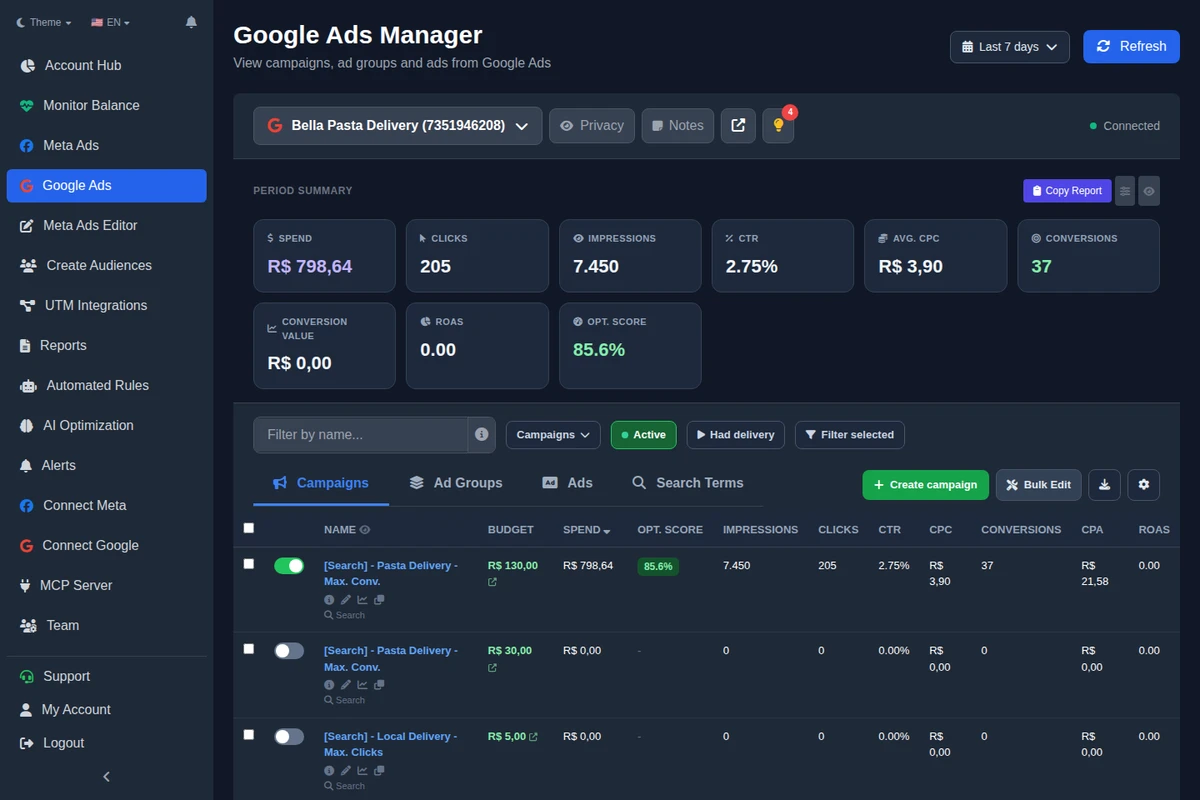
Ads Editor's Google manager has four doors to the same adjustment, all with a confirmation showing before and after:
- Schedule and devices (campaign): a clickable, draggable 7-day by 24-hour grid with each hour's performance for the period. Each block takes an adjustment, and each device takes an adjustment or Stop showing. Fields follow the bid strategy: where Google accepts the value but automated bidding will not apply it, the screen says so.
- Performance by segment (Segments tab): device, hour of day, day of week and landing page, with each row's CPA compared to the average. Adjust from there, and write a device adjustment to several campaigns at once.
- Demographics (ad group): gender, age range, household income and parental status, with exclude, adjust bid by % or reset to default.
- Audiences: adjust a linked audience in observation, with the same warning when bidding is automated.
Since October 11, 2026, the Google AI optimization can also adjust on its own if you turn on Auto bid adjustments in % (device, day, audience, location); demographics has its own switch. The limits, checked in the product documentation on October 17, 2026:
Guardrails on Ads Editor's automatic adjustments
Search campaigns only. Only where Google uses the adjustment: manual CPC and Maximize clicks, plus devices on Target CPA. Nothing on a campaign in learning or with a bid strategy change in the last 14 days. Steps of 10 to 30 points, the same segment is not touched again for 14 days, up to Google's limits. Excluding a device, hour or location is always a suggestion, never automatic. Everything can be undone from the history.
What are the most common bid adjustment mistakes?
- Leaving adjustments on a Smart Bidding campaign, thinking they help.
- Adjusting on thin data. Three tablet conversions say nothing.
- Stacking without doing the math. +50% on mobile and +50% at peak hours become +125% where they overlap.
- Excluding computers because CPA is high, without noticing that is where the bigger orders close.
- Skipping negatives. Sometimes a segment is expensive because of the wrong searches; before lowering the bid, check your negative keywords.
If the real question is switching the whole bid strategy, do not adjust segments: test the switch in a Google Ads experiment. For the full multi-account routine, see how to manage Google Ads for multiple clients.
Frequently asked questions
What is the limit for Google Ads bid adjustments?
Device runs from -100% to +900%. Location, ad schedule, audiences, demographics and calls run from -90% to +900%, and combined increases cannot exceed +900%.
Do bid adjustments work with Maximize conversions?
No, except a -100% device exclusion. On Target CPA, a device adjustment changes that device's CPA target, according to Google Ads Help.
How do I stop showing Google ads on mobile?
Set a -100% bid adjustment on mobile for the campaign. Device is the only adjustment that reaches -100%.
Do bid adjustments add up?
They multiply. +20% for a location and -50% for a day become 1.20 × 0.50 = 0.60 of the bid where both apply.
If the campaign and ad group both have a device adjustment, which one applies?
The ad group one, unless the campaign has -100% for that device: then the ad group adjustment is ignored.
Glossary
- Bid adjustment
- A percentage that raises or lowers bids for a device, schedule, location, audience or demographic.
- Smart Bidding
- Google's automated strategies (Target CPA, Target ROAS, Maximize conversions and value) that set bids on their own.
- Bid modifier
- The API name for an adjustment (bid_modifier): 1.2 is +20%, 0 is -100%.
- Segment
- A slice of campaign traffic, such as a device, an hour of the day or an age range.
References
- Google Ads Help: About bid adjustments (checked October 17, 2026). Supports: Adjustment types and ranges (device -100% to +900%; location, ad schedule, audiences, calls and demographics -90% to +900%); adjustments multiply with a +900% cap; $1 bid with +20% and -50% equals $0.60; the most specific location wins; ad group device adjustment replaces the campaign one unless the campaign is at -100%; Smart Bidding does not support manual adjustments except device on Target CPA as a target adjustment, and still respects the ad schedule.
The claim supported by each source is shown above.
About the author
Matheus Mello, founder of Ads Editor and owner of YEP Agência. Runs client ad accounts at YEP Agência and built Ads Editor so his own agency could stop publishing ads one at a time. Usage numbers quoted on the blog come from the product activity log. Instagram: @theusm