Facebook ad account audit: a 12-point checklist and a 2-minute AI diagnosis
By Matheus Mello, founder of Ads Editor and owner of YEP Agência · Published · 4 min read
A Facebook ad account audit is what every media buyer runs when taking on a new client, and what should happen every week on existing ones: structure, learning, creative, audiences, tracking and balance, before the problem shows up in results. This guide gives you a 12-point checklist and shows how to get the same read with AI in Ads Editor, for you or ready for the client.
Connect my AIQuick answer
To audit a Facebook ad account, check 12 points: structure and naming, learning phase, budget per ad set, audience overlap, frequency and tired creative, Advantage+ settings, conversion tracking, UTMs, rejections, balance, and cost per result against last week. In Ads Editor, the AI Diagnosis reads the account in about 2 minutes, without changing anything.
Summary
- Start with tracking and structure: without reliable conversions, everything else misleads.
- Always compare with the previous week; a single number doesn't tell you if it got worse.
- Rising frequency with falling CTR is the most common sign of tired creative.
- Ads Editor's AI Diagnosis returns a health score, the week-over-week comparison and actions with the number behind each one.
- On Google Ads, the same diagnosis reviews keywords, search terms and conversions, with suggested negatives.
In this article · 5 sections
What should a Facebook ad account audit check?
| # | Point | What to look at | Red flag |
|---|---|---|---|
| 1 | Structure | Campaigns by objective, ad sets and ads per ad set | Dozens of ad sets with tiny budgets |
| 2 | Naming | A naming convention | Names like New ad set 3 |
| 3 | Learning phase | Ad sets in learning limited | More than half limited |
| 4 | Budget | Budget per ad set vs cost per result | Budget below a few results a day |
| 5 | Audiences | Overlap and size | The same audiences across many ad sets |
| 6 | Frequency and creative | Frequency and CTR per ad | Frequency up and CTR down together |
| 7 | Advantage+ | Audience, placements and enhancements on | On with no one having decided it |
| 8 | Tracking | Pixel, Conversions API and optimization event | Optimization event not firing |
| 9 | UTMs | Parameters on ads | Sales with no source ad |
| 10 | Rejections | Rejected and limited ads | Rejected creative still in the ad set |
| 11 | Balance and billing | Prepaid balance and charges | Less than 3 days of balance |
| 12 | Results | Cost per result vs last week | Cost rising with no budget change |
Each point has its own guide: learning phase budget, creative testing, naming convention and Meta Ads error codes.
In what order should you audit?
- Tracking first (8 and 9). Without reliable conversions, cost per result lies.
- Money (11 and 12). Balance and week-over-week cost tell you how urgent it is.
- Structure and learning (1 to 4). That's usually where the big waste is.
- Audiences and creative (5 to 7). That's where next week's gains are.
- Rejections (10). Clean up what Meta already refused.
How do you run the audit with AI in Ads Editor?
- In Meta Ads or Google Ads, pick the account. The diagnosis covers one account at a time.
- Click AI analyses in the filter row, then AI diagnosis.
- Choose who the report is for: For the media buyer (actions with numbers and deadlines) or For the client (plain language, ready to send).
- Check the AI credit cost and click Run diagnosis. It takes about 2 minutes.
- Copy the text for chat or email, or export a PDF. Past diagnoses reopen without spending credits.
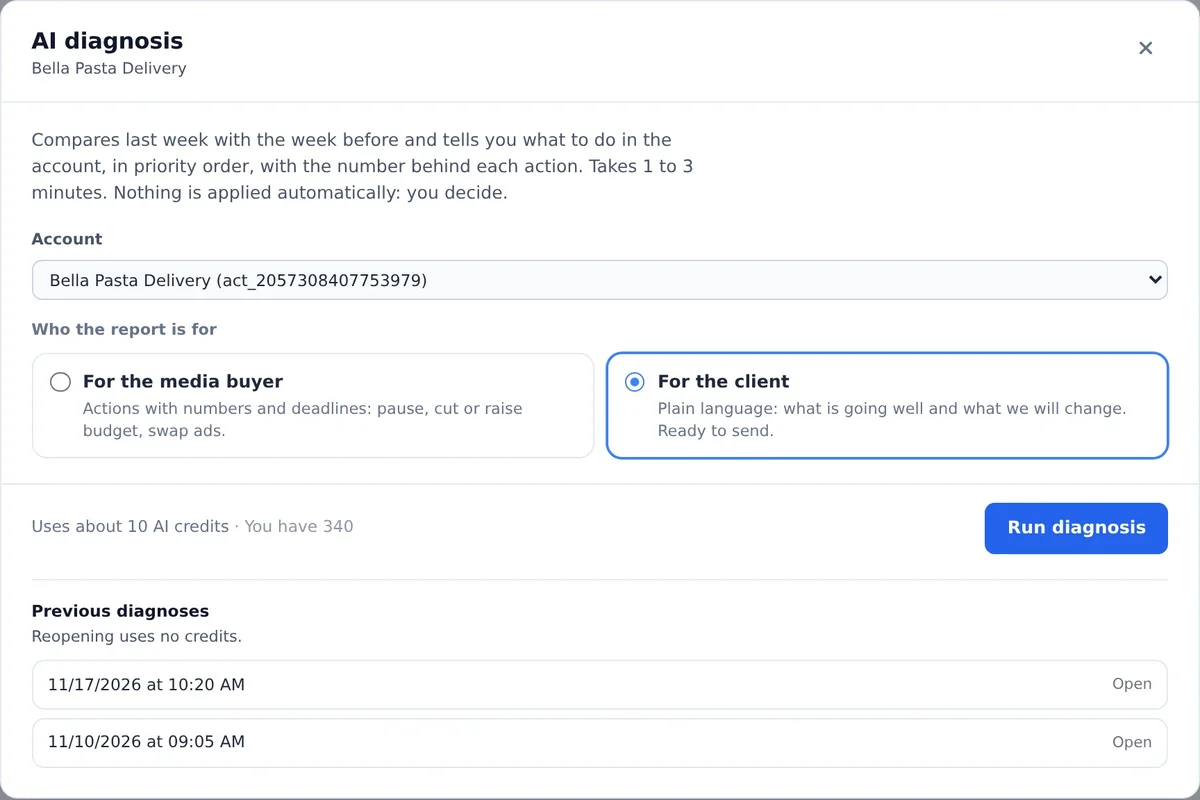
On Meta Ads, the diagnosis includes the account health score, the comparison with last week and what to do, with the number behind each action. On Google Ads, it reviews keywords, search terms and conversions and suggests negatives.
Nothing changes on its own
The diagnosis is a report: it suggests, and you decide and apply. The same request works in the AI copilot and through the MCP.
What doesn't the Ads Editor diagnosis do?
- It doesn't inspect the pixel code on your site; it reads what the account records.
- It doesn't apply changes for you.
- It isn't on Starter: it's part of Pro and above; in the free trial, the Meta diagnosis is unlocked.
- Each diagnosis spends AI credits, and the cost shows before you generate.
How often should you audit?
- New client: a full audit before touching anything, with the client version as your first deliverable.
- Weekly: points 6, 11 and 12, which move fast.
- Monthly: the full list, alongside the monthly report.
Step by step in Ads Editor
Help Center articles that walk through this task screen by screen:
Frequently asked questions
How do you audit a Facebook ad account?
Check tracking, balance and cost per result first; then structure, learning, audiences, creative, Advantage+ and rejections. In Ads Editor, the AI Diagnosis does that read in about 2 minutes.
Does the AI diagnosis change the account?
No. It returns a report with what to do; you decide and apply.
Can I audit a Google Ads account too?
Yes. On Google Ads, the diagnosis reviews keywords, search terms and conversions and suggests negatives.
Which plan includes the AI Diagnosis?
Pro and above. In the 7-day free trial, the Meta account diagnosis is unlocked.
Glossary
- Learning limited
- An ad set that can't get enough results to exit Meta's learning phase.
- Health score
- The score Ads Editor's diagnosis gives a Meta account based on the week's signals.
- AI credits
- Ads Editor's usage allowance for AI analyses; each analysis shows its cost before it runs.
References
- Ads Editor Help Center: AI account diagnosis. Supports: The AI diagnosis reads a Meta or Google account in about 2 minutes and returns what to do today and over the next 7 days, for the media buyer or ready for the client; nothing in the account is changed; it is part of Pro and above.
The claim supported by each source is shown above.
About the author
Matheus Mello, founder of Ads Editor and owner of YEP Agência. Runs client ad accounts at YEP Agência and built Ads Editor so his own agency could stop publishing ads one at a time. Usage numbers quoted on the blog come from the product activity log. Instagram: @theusm