How to schedule Facebook ads: start date, end date and dayparting in Meta Ads
By Matheus Mello, founder of Ads Editor and owner of YEP Agência · Published · 7 min read
To schedule Facebook ads you set three things on the ad set: when it starts, when it stops, and which hours it runs. Each one follows its own Meta rule, and the third one is why so many media buyers find ad scheduling greyed out.
Quick answer
To schedule Facebook ads, set a start date and time on the ad set: it waits and starts on its own. To run ads only at certain hours, the ad set needs a lifetime budget and an end date; with a daily budget, ad scheduling is unavailable. Ads Editor can also schedule the start when you duplicate campaigns.
Summary
- Scheduling lives on the ad set: start time, end time and ad schedule.
- An end date is required whenever the ad set uses a lifetime budget.
- Dayparting only works with a lifetime budget, in whole-hour blocks of at least one hour.
- By default, the ad schedule follows the viewer's time zone, not the ad account's.
- In Ads Editor, the optional Schedule start field on Duplicate creates the copy active and holds delivery until the time you pick.
Where does Facebook ad scheduling live?
Meta keeps scheduling on the ad set, not the campaign. The Marketing API reference, checked on October 17, 2026, describes three fields:
- Start time (
start_time): when the ad set can begin delivering. - End time (
end_time): required when the ad set has a lifetime budget. With a daily budget, the ad set can run continuously. - Ad schedule (
adset_schedule): the days of the week and hours the ad set runs. Only for lifetime budgets.
In practice, a campaign with three ad sets can have three different start times. It starts spending when the first ad set starts, and an ad schedule applies to every ad inside that ad set.
| What you want | Where to set it | What Meta requires |
|---|---|---|
| Start on a future date | Ad set start time | A future date and time (Ads Editor asks for at least 5 minutes ahead) |
| Stop on a date | Ad set end time | Required with a lifetime budget; optional with a daily budget |
| Run only on certain days and hours | Ad set ad schedule | Lifetime budget; whole-hour blocks of at least 1 hour |
| Launch the same ad set in several accounts at the same minute | Duplicate with a scheduled start | In Ads Editor: optional Schedule start field |
How do you schedule a start date in Meta Ads Manager?
- Create or open the campaign and go to the ad set.
- In the budget and schedule section, pick the start date and time.
- If the campaign has a fixed end, set the end date. With a lifetime budget it is required.
- Publish. The ad set waits for the scheduled time and starts on its own, as long as the campaign, ad set and ad are active and approved.
Start time and ad schedule use different clocks
The start time is an exact moment: the API takes the date with a time zone offset. The ad schedule, according to Meta's documentation, follows the viewer's time zone by default, and you can switch it to the ad account's time zone. For a campaign across the US, "9 to 5" means 9 to 5 local time for each person.
How do you run Facebook ads only at certain hours?
That is ad scheduling, also called dayparting. Meta's Pacing and Scheduling documentation, checked on October 17, 2026, sets the rules:
- Only use ad scheduling with lifetime budgets.
- Each block starts and ends on the hour and lasts at least one hour.
- The schedule applies to every ad in the ad set.
- Pacing takes the schedule into account when calculating your bid.
When it pays off: a business that only answers the phone or chat during office hours and does not want to buy conversations nobody replies to at 3 a.m. When to think twice: a conversion ad set with little volume, where cutting hours also cuts the data delivery learns from. Test it on one ad set before rolling it out.
Why is Facebook ad scheduling not available?
Almost always because the ad set uses a daily budget. Switch to a lifetime budget, set an end date, and the schedule becomes available. If you need a daily budget, pause and resume with a rule or by hand instead.
How do you duplicate a campaign with a scheduled start in Ads Editor?
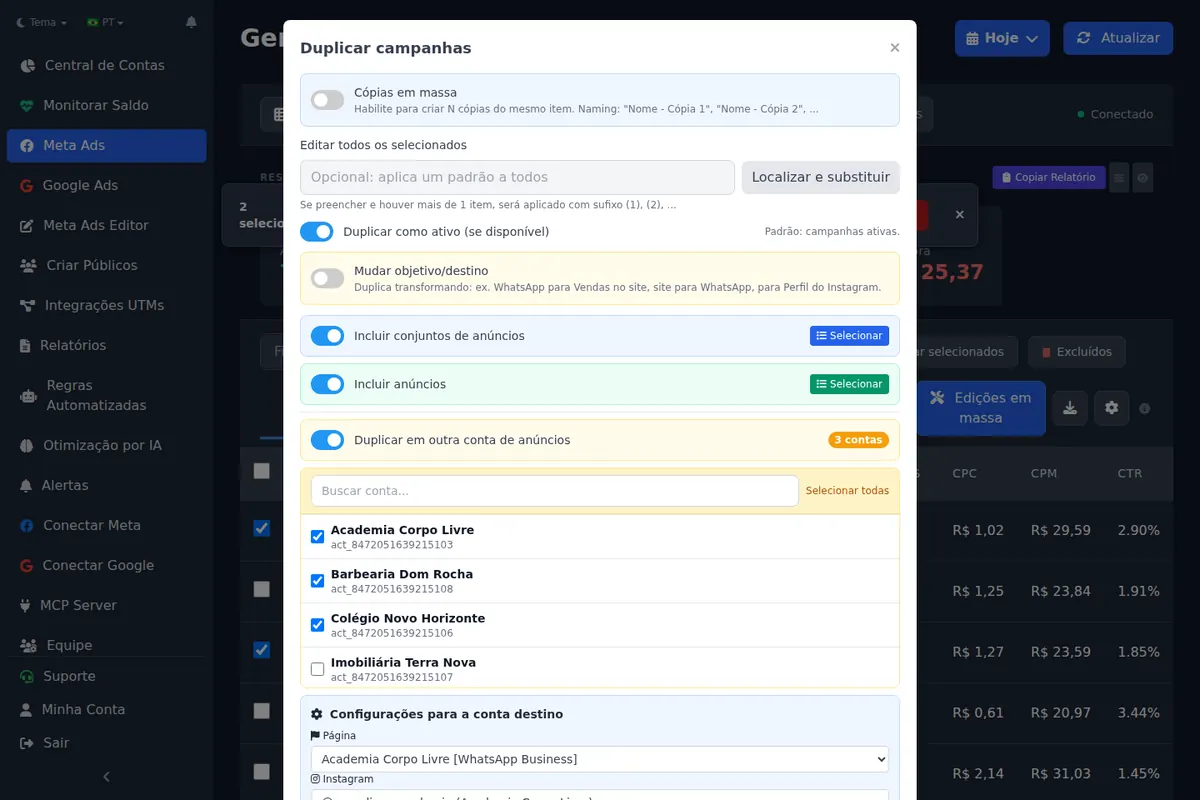
Since October 14, 2026, Ads Editor's duplicate flow has a field for when the copy starts. It solves the case Ads Manager handles poorly: the same launch across several client accounts, all starting at the same minute.
- In Ads Editor's Meta manager, select the campaign or ad set and click Duplicate.
- If the copy goes to other accounts, tick the destination accounts: one, several, Select all or a saved group.
- Open the Schedule start (optional) row and pick a date and time at least 5 minutes ahead.
- Confirm. The copy is created active and only delivers from the scheduled start.
Three details the duplicate handles for you: if the source end date falls before the new start, it is dropped and the ad set runs continuously; with a lifetime budget, which requires an end date, the end becomes start plus 14 days; and the source ad schedule is copied too. The Create campaign wizard has optional start and end fields as well. Through MCP, the clone campaign tool accepts a scheduled start; the copy is created paused and, once activated, delivers only from that time.
Duplicating is routine for multi-account media buyers
In the 90 days to October 17, 2026, 43 Ads Editor users logged 1,277 campaign duplications, and 18 logged 407 ad set duplications (Ads Editor's own activity log).
When should you schedule instead of publishing now?
- Launch dates (cart opening, Black Friday, a store opening): publish days earlier with a scheduled start, so ad review happens before the launch and not during it.
- Offer switch at midnight: the new campaign starts at an exact minute and the old one stops at its end date.
- Same launch across accounts (franchises, store networks, clients in the same niche): one duplicate with a scheduled start instead of ten manual setups. See how to copy a campaign to another ad account.
- Fixed-term campaigns: a lifetime budget with an end date guarantees the money stops on time, without anyone pausing it.
What are the most common scheduling mistakes?
- An end date in the past on a copy. Meta rejects ad sets with an expired end. Ads Editor drops it or, with a lifetime budget, moves it 14 days ahead.
- Expecting dayparting on a daily budget. Ad scheduling only exists with lifetime budgets.
- Forgetting the time zone. The ad schedule follows the viewer's time zone unless you switch it to the account's.
- A paused campaign. A scheduled start does not activate anything: campaign, ad set and ad must be active.
- A lifetime budget that is too small. A few days and a small budget tend to make delivery unstable. See budget and the learning phase.
Media buyers with many accounts usually pair scheduling with a fixed weekly routine per client; the guide to managing multiple Facebook ad accounts lays it out, and the frequency cap guide covers the other half of a dated campaign: not showing the same ad too often to the same person.
Frequently asked questions
Can I schedule a Facebook ad to start on another day?
Yes. Set the start date and time on the ad set; it waits and starts on its own, as long as it is active and approved.
Why is ad scheduling greyed out in Meta Ads Manager?
Because ad scheduling only works with a lifetime budget. With a daily budget the option is unavailable.
Which time zone does the Facebook ad schedule use?
By default, the viewer's time zone, according to Meta's documentation. You can switch it to the ad account's time zone.
Can I duplicate a campaign with a start date already set?
In Ads Editor, yes: the optional Schedule start field on Duplicate creates the copy active and holds delivery until the time you choose, in one or many accounts.
Does a daily budget work for a one-day campaign?
No. Meta's API reference says daily budgets only apply to ad sets running longer than 24 hours; for one day, use a lifetime budget with an end date.
Glossary
- Start time
- When the ad set can begin delivering (start_time in the API).
- End time
- When the ad set stops; required with a lifetime budget (end_time in the API).
- Ad scheduling
- The days and hours an ad set runs, also called dayparting; requires a lifetime budget.
- Lifetime budget
- A budget for the whole life of the ad set, paced until its end date.
References
- Meta for Developers: Pacing and Scheduling (checked October 17, 2026). Supports: Only use ad scheduling with lifetime budgets; adset_schedule sets days and hours; blocks on the hour and at least one hour apart; applies to all ads in the ad set; viewer time zone by default, or the advertiser's; pacing takes the schedule into account.
- Meta for Developers: Ad Set, Marketing API reference (checked October 17, 2026). Supports: start_time is the ad set start; end_time is required when lifetime_budget is set; daily_budget only applies to ad sets longer than 24 hours.
The claim supported by each source is shown above.
About the author
Matheus Mello, founder of Ads Editor and owner of YEP Agência. Runs client ad accounts at YEP Agência and built Ads Editor so his own agency could stop publishing ads one at a time. Usage numbers quoted on the blog come from the product activity log. Instagram: @theusm