How to track ClickBank and Digistore24 sales from Facebook ads
By Matheus Mello, founder of Ads Editor and owner of YEP Agência · Published · 6 min read
To track ClickBank sales from Facebook ads you need three things to line up: the ad's IDs on the click, those IDs carried into a field ClickBank or Digistore24 returns, and a server-to-server notification that brings each sale back. Miss one and the sale arrives without an origin, and you end up optimizing on Meta's purchase count instead of what you were paid.
Connect my sales platformQuick answer
Put Meta's dynamic campaign, ad set and ad IDs in every ad's URL parameters, carry them into tid or aff_sub on ClickBank and cid on Digistore24, and receive each sale by postback, INS or IPN. Then compare approved sales per ad with spend, counting refunds and chargebacks, not pixel purchases.
Summary
- Tracking has three links: IDs on the ad, IDs in a network field, sale back by server notification.
- ClickBank fields reject pipes and braces, so send IDs only.
- Affiliates use ClickBank's Postback/Pixels or Digistore24's S2S postback; sellers can use INS or IPN.
- Refunds and chargebacks come back by INS and IPN; ClickBank's postback reports purchases only.
- Ads Editor receives both networks natively and shows sales on the ad that produced them.
In this article · 7 sections
Why don't Meta's numbers match your ClickBank sales?
Meta counts a purchase when its pixel or Conversions API sees one, within its attribution window, including people who viewed an ad and bought later by another path. ClickBank and Digistore24 count paid orders, then subtract refunds and chargebacks. On an affiliate offer you usually do not control the checkout, so Meta may see no purchase at all. The full list of causes is in why Meta Ads sales don't match your platform. The fix is not to pick one number but to bring the network's sale back to the ad.
Step 1: put the IDs on every ad
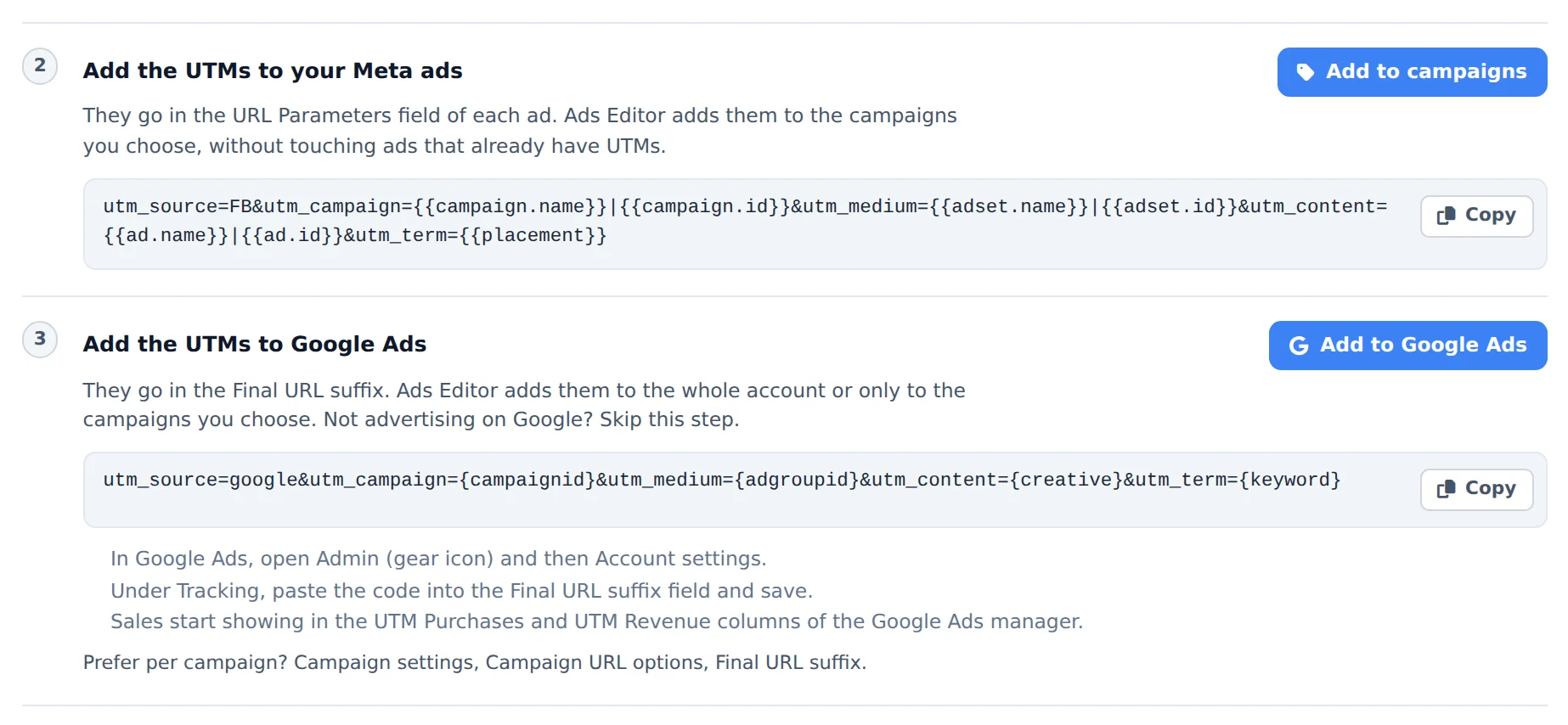
Use Meta's dynamic parameters in the URL parameters field of each ad:
URL parameters (Meta)
utm_source=FB&utm_campaign={{campaign.name}}|{{campaign.id}}&utm_medium={{adset.name}}|{{adset.id}}&utm_content={{ad.name}}|{{ad.id}}&utm_term={{placement}}
Meta fills the fields at click time, so one template serves every ad. Applying it by hand across dozens of campaigns is where ads slip through without it; Ads Editor's Add to campaigns writes the template on the ads of up to 15 campaigns at a time and skips the ones that already have it.
Step 2: carry the IDs into a field the network returns
On ClickBank
ClickBank returns tid and, since 2024, named fields such as campaign, adgroup, ad and aff_sub1 to aff_sub5 in the postback. Values with |, { or } are not stored, so do not pass the name-and-ID UTMs as they are. Two ways to do it:
- Bridge page with a script. The script reads the UTMs on the landing URL and rewrites the hoplink. Ads Editor's script writes the compact code
fbx<campaign id>x<ad set id>x<ad id>intotid(hoplinks) andvtid(seller payment links). It has letters and digits only, so ClickBank stores it. - Direct linking. Add the IDs straight to the hoplink in the ad's URL parameters, for example
tid=fbx{{campaign.id}}x{{adset.id}}x{{ad.id}}.
On Digistore24
Digistore24 returns cid (the click ID) in the S2S postback, and ds24tr from the vendor's order form comes back as trackingkey in the IPN. Ads Editor's script writes the compact code into both.
Step 3: receive every sale by server notification
| Network | Who you are | Where to set it | What to send |
|---|---|---|---|
| ClickBank | Affiliate or seller | Integrations, Postback/Pixels, Add Integration, Custom Postback/Pixel | Receipt, event type, amount and your tracking field, such as {receipt_id}, {event_type}, {affiliate_earnings}, {tid} |
| ClickBank | Seller | Vendor Settings, My Site, Advanced Tools, Edit, Instant Notification URL (request access), version 8.0 | Encrypted INS; decrypting needs the account's Secret Key |
| Digistore24 | Affiliate | Settings, Integration (IPN), Add new connection, S2S postback | Transaction type, transaction ID, commission, currency and {cid} |
| Digistore24 | Vendor | Settings, Integrations (IPN), New connection, Generic webhook | Signed IPN (sha_sign); the receiver must reply OK |
ClickBank retries a postback up to three times on a server error and does not fire it for test card purchases. INS waits up to 3 seconds for a 2xx answer and retries every four hours, up to five times. Digistore24 retries the IPN until it gets the text OK. ClickBank's Postback/Pixels fires on purchases (initial, upsell or combined), not on refunds or chargebacks. On ClickBank, refunds reach Ads Editor by the seller's INS; an affiliate on the postback should check refunds in ClickBank's reports.
How to set it up in Ads Editor
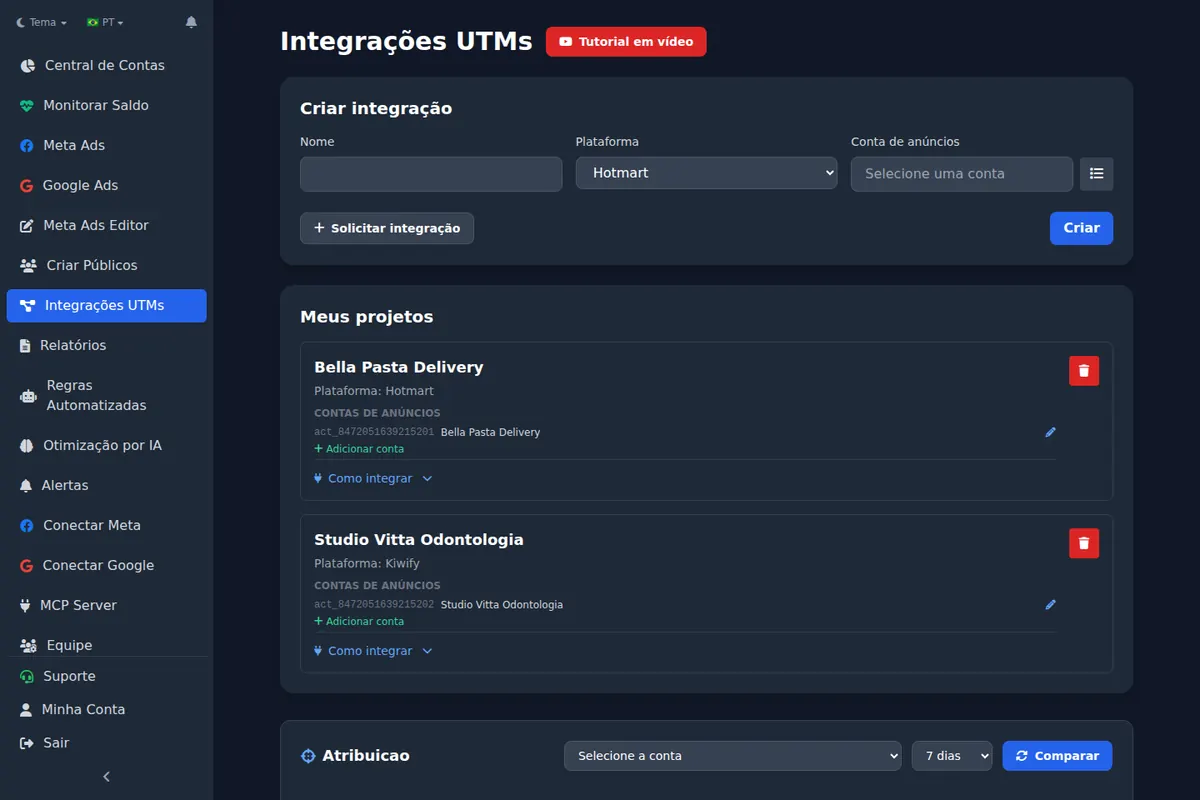
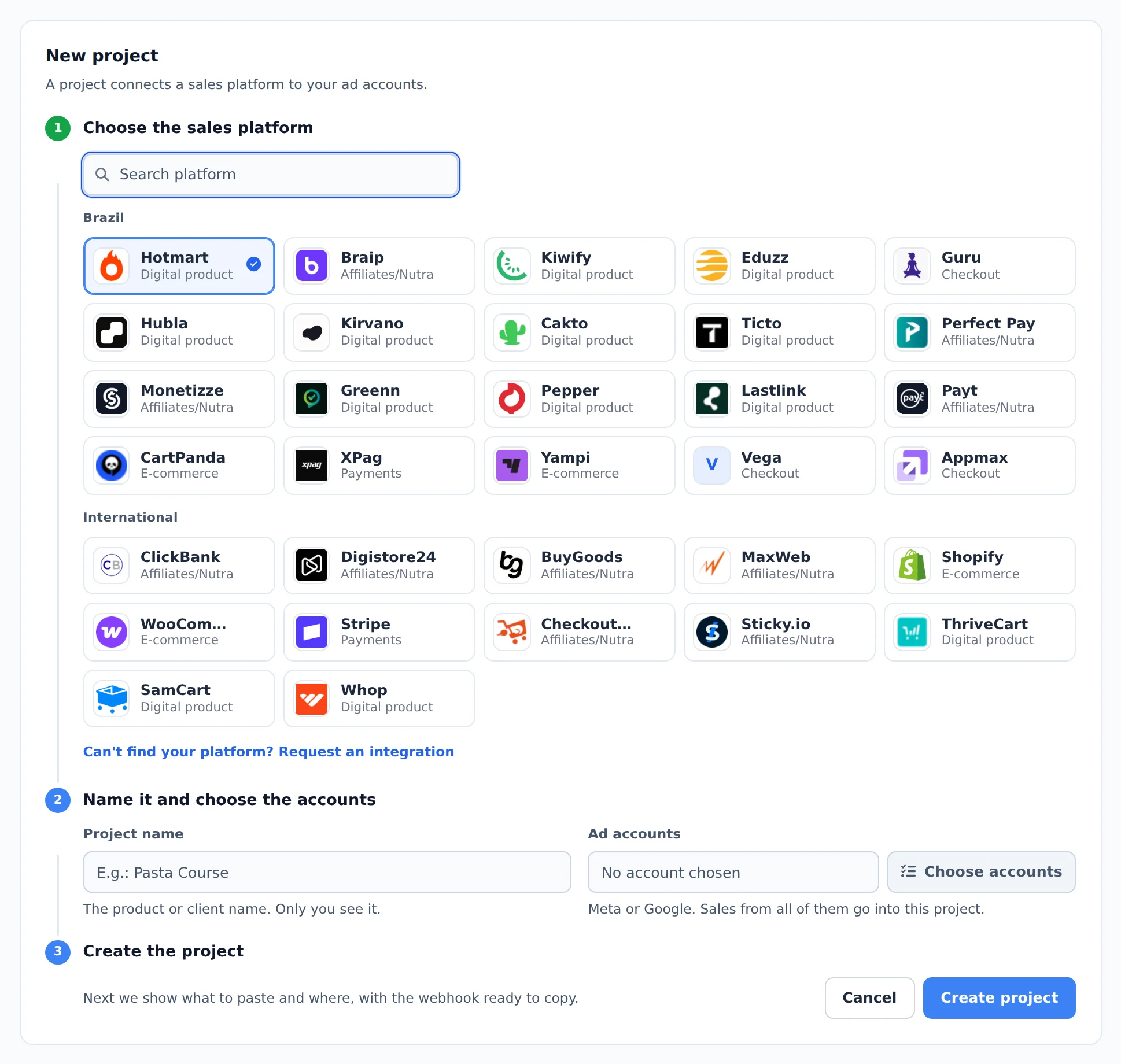
- In UTM Integrations, under New project, pick ClickBank or Digistore24 in the grid, name the project and choose the ad accounts.
- Open Set up tracking, copy the script in block 1 and install it on the bridge page (in the
<head>or with Google Tag Manager). - In block 2, click Add to campaigns.
- Copy the project URL. ClickBank sellers paste it in the Instant Notification URL (version 8.0) and save the account's Secret Key in the project; Digistore24 vendors create the Generic webhook and save the same SHA passphrase in the project.
- Affiliates on ClickBank can use the same URL in a Custom Postback with
?receipt_id={receipt_id}&event_type={event_type}&amount={affiliate_earnings}&tid={tid}; ClickBank's postback amounts are in dollars. - Make a test purchase and check Check that it worked in the project.
Approved sales then appear in UTM Purchases, UTM Revenue and Profit on each campaign, ad set and ad; a refund or chargeback that arrives later takes the sale out. The Attribution section compares, campaign by campaign, Meta's purchases with the sales that arrived with UTMs, converting each currency to the ad account's.
What about the Conversions API?
Reading sales by ad tells you which ads make money. Telling Meta about those sales, so delivery optimizes for buyers, is a separate job: it needs a server event sent to the Conversions API with the buyer data you are allowed to share. Some trackers turn a network postback into a Conversions API event. Ads Editor does not send events to Meta; it reads the sales for reporting and decisions. See the Conversions API guide.
Which mistakes break the tracking?
- Ads without the template, usually the ones duplicated in a hurry.
- A bridge page without the script, or a button that sends to the hoplink by JavaScript the script never sees.
- Names with pipes passed into ClickBank fields, which ClickBank silently drops.
- Counting the day's sales before refunds: on low-ticket offers, check the numbers again after the refund window.
Step by step in Ads Editor
Help Center articles that walk through this task screen by screen:
Frequently asked questions
How do I track ClickBank sales from Facebook ads?
Pass the ad IDs into tid or aff_sub on the hoplink and receive each sale with ClickBank's Postback/Pixels or INS, then read approved sales per ad.
What is the best ClickBank tracking field for Facebook ads?
Any field ClickBank returns in the postback works; use one consistently. The compact fbx code in tid keeps campaign, ad set and ad in one value with allowed characters.
Does the Facebook pixel see ClickBank purchases?
Only if a pixel fires on the order confirmation, which affiliates rarely control. That is why the sale should come back by postback.
Can I track Digistore24 sales without a tracker?
Yes, if the S2S postback or IPN goes to a tool that reads cid or trackingkey and links it to the ad, as Ads Editor's Digistore24 integration does.
Glossary
- tid
- ClickBank's tracking ID on the hoplink, returned in reports and in the {tid} macro.
- cid
- Digistore24's click ID parameter on the affiliate link, returned in the S2S postback.
- Compact code
- The value fbx<campaign>x<ad set>x<ad> that Ads Editor writes into fields that accept a single free text.
References
- ClickBank Support: Affiliate tracking parameters. Supports: ClickBank tracking parameters, limits, allowed and disallowed characters.
- ClickBank Support: Postback/Pixels integration guide. Supports: Postback/Pixels menu path, events, macros by role, retries on 5xx, test cards do not fire.
- ClickBank Support: Instant Notification Service (INS). Supports: INS setup path, request access, version 8.0, Secret Key, 3-second response and retries.
- RedTrack Help: Digistore24 integration. Supports: Digistore24 S2S postback menu path and cid mapping.
- Meta for Developers: Conversions API. Supports: The Conversions API sends server events to Meta, complementing the pixel.
- Ads Editor Help Center: Track digital product sales back to the ad. Supports: Ads Editor integration steps and the list of 32 platforms, including ClickBank and Digistore24.
The claim supported by each source is shown above.
About the author
Matheus Mello, founder of Ads Editor and owner of YEP Agência. Runs client ad accounts at YEP Agência and built Ads Editor so his own agency could stop publishing ads one at a time. Usage numbers quoted on the blog come from the product activity log. Instagram: @theusm