Best PPC reporting tools for Meta Ads and Google Ads: 7 options, free and paid
By Matheus Mello, founder of Ads Editor and owner of YEP Agência · Published · 5 min read
The best PPC reporting tools solve the job agencies repeat most: pulling Meta Ads and Google Ads numbers together and sending them to the client every week. This list compares 7 options, free and paid, on what the report shows, what it costs and what it can't do. Prices were checked on the official pages on November 25, 2026.
Build a report nowQuick answer
For Meta Ads and Google Ads reporting, the free option is Data Studio, which needs a paid connector such as Supermetrics for Meta. AgencyAnalytics, DashThis and Swydo deliver ready reports from many sources. Ads Editor sends Meta, Google and Instagram reports as a link, with UTM sales, alongside account management. Pick by the sources your client requires.
Summary
- Data Studio is free and reads Google Ads natively; Meta needs a third-party connector.
- Supermetrics Starter starts at $44/month billed yearly, with 2 sources and 1 user.
- AgencyAnalytics charges $20 per client; DashThis prices by dashboards; Swydo by data sources.
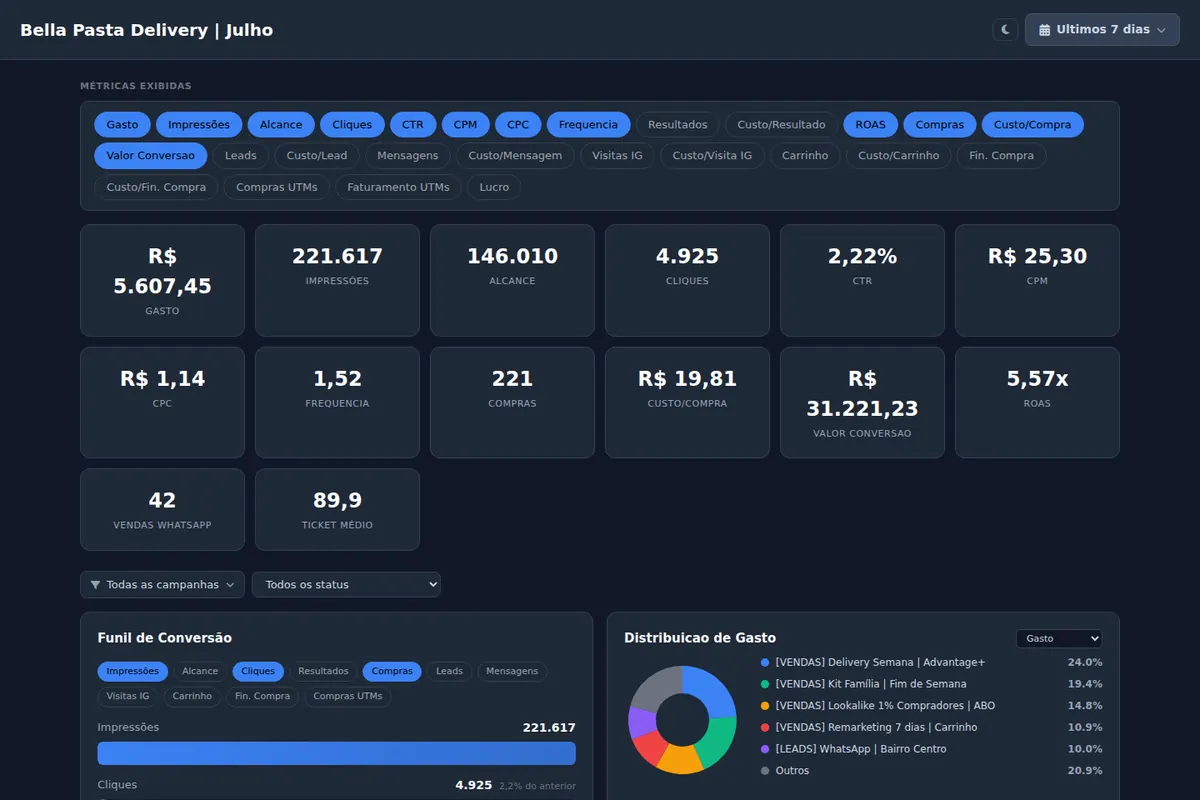
- Ads Editor sends password-protected report links with branded templates and an AI summary of the period.
- For the weekly update, a short text in WhatsApp or email often beats a PDF.
In this article · 5 sections
Which reporting tool fits which case?
| Tool | Sources | Format | Entry price |
|---|---|---|---|
| Ads Editor | Meta Ads, Google Ads, Instagram, UTM sales | Password-protected link, PDF, quick text summary | $19/month (10 accounts) |
| Data Studio | Google Ads and Analytics native; Meta via connector | Dashboard link | Free |
| Supermetrics | Sources of your choice, sent to Data Studio, Sheets or AI chats | Data in your destination | $44/month billed yearly |
| AgencyAnalytics | 90+ integrations | Reports, dashboards, white-labeled portal | $20 per client/month billed yearly |
| DashThis | Marketing integrations by source | Dashboards | $44/month (3 dashboards, 15 sources) |
| Swydo | 40+ integrations | Reports and dashboards, MCP | $62/month billed yearly (10 sources) |
| Meta Ads Manager export | The open account | Spreadsheet | Free |
What does each tool do well, and what doesn't it do?
1. Ads Editor
- Does well: client report links with Meta Ads, Google Ads and Instagram, optional password, templates that keep your agency branding, last-access tracking, an AI-written analysis of the period, UTM sales and manual metrics; a quick text summary to paste into a chat; CSV and PDF exports.
- Doesn't do: TikTok, LinkedIn and organic social beyond Instagram; CRM and Search Console data.
- Price: $19 (Starter, 10 accounts), $39 (Pro, 20), $79 (Business, 40), $139 (Scale, 70) and $179 (Enterprise, unlimited accounts) per month, billed in US dollars, 20% off yearly; 7-day free trial, account management included.
- Best for: buyers who want reporting and Meta and Google management in one place. See Facebook Ads client report.
2. Data Studio (formerly Looker Studio)
- Does well: free dashboards with Google Ads and Analytics built in.
- Doesn't do: a native Meta connector or ready templates: you build them.
- Price: free; the Meta connector is paid separately.
- Best for: people with time to build and maintain templates.
3. Supermetrics
- Does well: moving ad data into Data Studio, Google Sheets, a data warehouse, or Claude, ChatGPT and Copilot.
- Doesn't do: the report itself: it delivers data, and the visuals live in your destination.
- Price: Starter from $44/month billed yearly (1 destination, 2 sources, 1 user, 2 accounts per source); Growth from $177; Enterprise on request.
- Best for: teams that already have a BI or a Data Studio setup.
4. AgencyAnalytics
- Does well: client reports and dashboards with 90+ integrations, unlimited reports and a white-labeled client portal.
- Doesn't do: managing campaigns.
- Price: $20 per client per month billed yearly; 14-day trial, no card.
- Best for: agencies reporting many channels per client.
5. DashThis
- Does well: dashboards that combine marketing integrations, priced by dashboards and sources, with an MCP connector on all plans.
- Doesn't do: managing campaigns.
- Price: Individual $44/month (3 dashboards, 15 sources), Professional $139, Business $279 and Standard $429, as shown on the page; yearly billing saves up to $840 a year.
- Best for: small teams that want a simple dashboard per client.
6. Swydo
- Does well: unlimited clients, users, dashboards and reports, 40+ integrations, an AI report builder and an MCP for Claude and ChatGPT.
- Doesn't do: managing campaigns.
- Price: $69/month or $62 billed yearly, with the first 10 data sources included, then $4.50 per source up to 100.
- Best for: agencies that want flat pricing by source, not by client.
7. Meta Ads Manager export
- Does well: a spreadsheet with the columns you chose, at no cost.
- Doesn't do: client-friendly visuals and Google Ads in the same file.
- Price: free.
- Best for: buyers who send few reports a month.
Prices change
Values are what each official page showed on November 25, 2026. Check before you buy.
Is there a free Meta Ads and Google Ads report?
Yes, with work. Data Studio is free and reads Google Ads on its own. For Meta, you export from Ads Manager and upload the file, or pay for a connector. That's fine for a few clients. With ten, building and checking the reports usually costs more than a tool.
What doesn't Ads Editor reporting do?
- No organic social beyond Instagram, and no TikTok or LinkedIn.
- No CRM, Search Console or external spreadsheets.
- No data warehouse export: for dozens of sources, use a connector and a BI.
Which format should you send?
- Link: the client opens it any time and you can see if they did. Best for the monthly report.
- PDF: good for meetings and clients who print.
- Short text: best for the weekly update, pasted into WhatsApp or email.
Step by step in Ads Editor
Help Center articles that walk through this task screen by screen:
Frequently asked questions
What is the best free tool for Facebook Ads reports?
Data Studio is free and reads Google Ads natively; Meta data comes in by manual export or a third-party connector, which is usually paid.
How much does AgencyAnalytics cost?
On November 25, 2026, it was $20 per client per month billed yearly, with a 14-day trial and no card.
Can a client report be password protected?
In Ads Editor, yes: the link can require a password and can be switched off without deleting the report.
Do I need Supermetrics to see Meta Ads in Data Studio?
You need some third-party connector, because Data Studio doesn't read Meta on its own. Supermetrics is one of the best known.
Glossary
- Connector
- An integration that moves data from an ad platform into a reporting tool.
- Data source
- One connected account or platform feeding a report; several tools price by it.
- White label
- Reports delivered under the agency's brand instead of the tool's.
References
- Google Cloud: Data Studio overview. Supports: Data Studio builds reports and dashboards at no charge.
- Ads Editor Help Center: create a client report. Supports: An Ads Editor report combines Meta Ads and Google Ads accounts, with configurable style and access, and is shared as a link.
- Ads Editor Help Center: quick summary for WhatsApp. Supports: Copy Report builds a text with the period's chosen metrics and per-campaign detail to paste into a chat; the table also exports to CSV and PDF.
The claim supported by each source is shown above.
About the author
Matheus Mello, founder of Ads Editor and owner of YEP Agência. Runs client ad accounts at YEP Agência and built Ads Editor so his own agency could stop publishing ads one at a time. Usage numbers quoted on the blog come from the product activity log. Instagram: @theusm