Nutra offer tracking: postbacks, subids and every sale back to the ad
By Matheus Mello, founder of Ads Editor and owner of YEP Agência · Published · 5 min read
Nutra offer tracking is harder than tracking a course sale: the funnel has upsells, the refund window is long, the checkout often belongs to someone else and the ad copy lives under Meta's health rules. What works is the same chain on every network: ad IDs on the click, a field the network returns, and a postback for every sale, upsell and refund.
Connect my sales platformQuick answer
To track nutra offers, put Meta's dynamic IDs on every ad, pass them in the field your network returns (subid, tid, cid or c1), and send the network's postback for sales, upsells, refunds and chargebacks to a tool that links them to the ad. Judge ads on approved revenue after refunds.
Summary
- Every network returns at least one free field: subid, tid, aff_sub, cid or c1.
- Upsells and refunds must come back too, or front-end ROAS lies in both directions.
- Affiliate networks report your commission; your own checkout (CheckoutChamp, Sticky.io) reports the order total.
- Meta's ad standards forbid copy that asserts a health condition about the viewer.
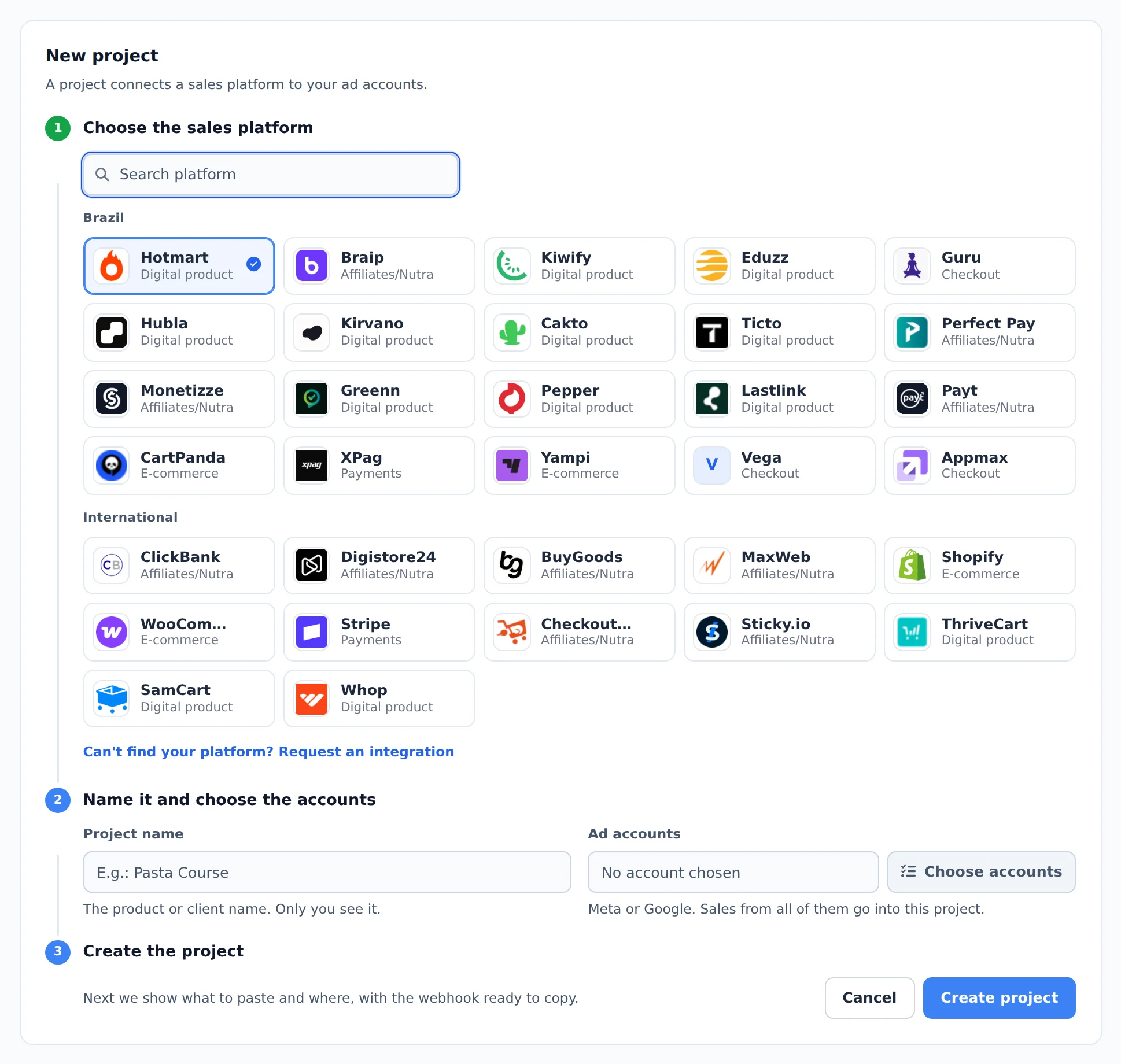
- Ads Editor receives ClickBank, Digistore24, BuyGoods, MaxWeb, CheckoutChamp and Sticky.io natively.
In this article · 6 sections
What makes nutra tracking different?
- Upsells. A large part of the revenue comes after the front end. If only the front-end sale is attributed, the ad that brings upsell buyers looks worse than it is.
- Refunds and chargebacks. They arrive days or weeks later. A campaign judged on day-one sales can be underwater by the end of the month.
- Someone else's checkout. As an affiliate you rarely control the thank-you page, so a pixel purchase is the exception, not the rule.
- Ad review. Meta's standards forbid copy that asserts or implies a health condition about the viewer: "New diabetes treatment available" is allowed, "Do you have diabetes?" is not.
Which field does each network return?
| Platform | Field on the link | Returned as | How the sale comes back |
|---|---|---|---|
| ClickBank | tid, aff_sub1 to aff_sub5, campaign, ad | {tid}, {aff_sub1}... macros | Postback/Pixels or INS |
| Digistore24 | cid; ds24tr on the vendor form | {cid}; trackingkey | S2S postback or IPN |
| BuyGoods | subid to subid5 (lowercase) | {SUBID} to {SUBID5} | Global postback, sales and refunds |
| MaxWeb | subid to subid5 | {SUBID} to {SUBID5} | Postback pixel, Purchase event only |
| CheckoutChamp | c1 to c3 | [c1] to [c3] | Postback pixel per offer and per upsell |
| Sticky.io | utm_* and c1 to c3 | {utm_campaign}, {c1}... | Postback URL profiles for approvals and for void, refund, chargeback |
How should the ad IDs travel?
Meta's template with names and IDs (utm_source=FB&utm_campaign={{campaign.name}}|{{campaign.id}}&utm_medium={{adset.name}}|{{adset.id}}&utm_content={{ad.name}}|{{ad.id}}&utm_term={{placement}}) is readable, but nutra fields often accept a single short value without pipes. Ads Editor uses a compact code for those fields: fbx<campaign id>x<ad set id>x<ad id>. On your own checkout you can add it straight to the ad's URL parameters, as the CheckoutChamp and Sticky.io integrations do: c1=fbx{{campaign.id}}x{{adset.id}}x{{ad.id}}. On affiliate offers, a script on the bridge page writes it into the network's field.
How do you count upsells and refunds?
- Front end and upsells in the same ad row. On CheckoutChamp, create one postback pixel for All Offers and another for All Upsells, swapping the amount for the upsell transaction total and adding
upsell=1. BuyGoods marks upsells with {CONV_TYPE} and {FLAG_UPSELL}. - Refunds on the same order. BuyGoods sends refunds to the same global postback with a negative commission; Sticky.io needs a second profile for void, refund and chargeback; ClickBank and Digistore24 send their own refund events (on ClickBank only by INS; its Postback/Pixels reports purchases only).
- Ignore non-sales. MaxWeb's Checkout Visit and ClickBank's order form impression are not purchases; leave them out of the postback or let your tool discard them.
How to set it up in Ads Editor
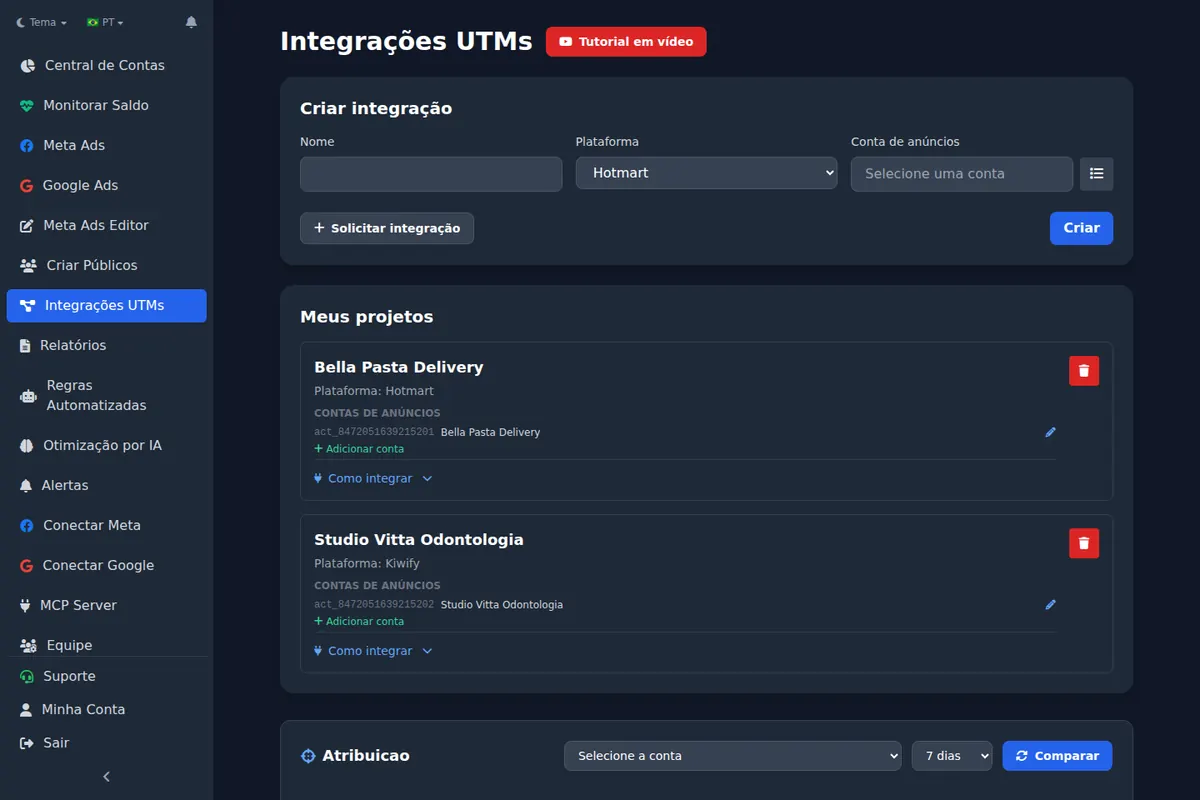
Each network or checkout is a project in UTM Integrations. The screen gives you the URL with the query the integration reads already filled in for postback platforms (BuyGoods, MaxWeb, CheckoutChamp, Sticky.io) and tells you where to paste it. ClickBank and Digistore24 take the URL in INS and IPN, with the Secret Key or SHA passphrase saved in the project.
After the first test sale shows up in Check that it worked, the UTM Purchases, UTM Revenue and Profit columns fill in on each campaign, ad set and ad. Affiliate networks report your commission, so revenue there is what you earn; your own checkout reports the order total.
What else should you watch?
- Currency. Ads Editor stores each sale in the currency the platform sent and the Attribution section converts to the ad account currency to compare with spend.
- Learning phase. Optimize delivery on an event with volume; a purchase you only learn about by postback does not feed Meta unless you send it to the Conversions API. See learning phase and minimum budget.
- Network comparisons. With the same tracking on every network you can run one angle to two offers and compare approved revenue per ad. Start with ClickBank vs Digistore24 and BuyGoods vs MaxWeb.
Step by step in Ads Editor
Help Center articles that walk through this task screen by screen:
Frequently asked questions
What is a nutra offer?
A supplement or wellness product sold through a direct response funnel, usually with upsells, promoted by affiliates or the brand's own media buyers.
How do I track nutra offers from Facebook ads?
Pass the ad IDs into the field your network returns and send every sale, upsell and refund by postback to a tool that links them to the ad.
Why do my nutra campaigns look profitable and then lose money?
Usually refunds and chargebacks arrive after you judged the campaign. Count them on the same ad row.
Does Ads Editor integrate with CheckoutChamp and Sticky.io?
Yes. Both are in the international list of UTM Integrations, with the postback URL ready to paste.
Glossary
- Upsell
- An extra offer shown after the first purchase, often the bulk of a nutra funnel's revenue.
- Chargeback
- A payment reversed by the buyer's bank, which the platform debits from the seller and affiliate.
- c1
- A pass-through parameter on CheckoutChamp and Sticky.io funnels that returns in the postback.
References
- Meta Advertising Standards: privacy violations and personal attributes. Supports: Ads cannot assert or imply health conditions; allowed and disallowed diabetes examples.
- ClickBank Support: Postback/Pixels integration guide. Supports: ClickBank postback events (including order form impression) and tracking macros.
- BuyGoods Support: postback setup and tokens. Supports: BuyGoods subids, {CONV_TYPE} and {FLAG_UPSELL}, global postback with purchases and refunds.
- RedTrack Help: Digistore24 integration. Supports: Digistore24 S2S postback and cid.
- Meta for Developers: Conversions API. Supports: Conversions API as the server path to send events to Meta.
- Ads Editor Help Center: Track digital product sales back to the ad. Supports: Ads Editor's list of 32 platforms including CheckoutChamp and Sticky.io, and the integration steps.
The claim supported by each source is shown above.
About the author
Matheus Mello, founder of Ads Editor and owner of YEP Agência. Runs client ad accounts at YEP Agência and built Ads Editor so his own agency could stop publishing ads one at a time. Usage numbers quoted on the blog come from the product activity log. Instagram: @theusm